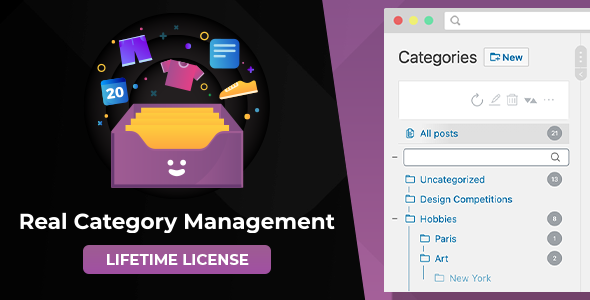
Managing a WordPress site is easy when you have five posts. It becomes a logistical nightmare when you have five hundred products, a thousand forum threads, or a library of courses. The default WordPress admin interface forces you to scroll through endless paginated lists, apply filters, and open individual items just to assign a category. Real Category Management: Content Management in Category Folders in WordPress eliminates that friction by transforming your standard category structure into an intuitive, file-manager-style folder tree. Developed by devowl, this utility plugin brings the familiar logic of Windows Explorer or Mac Finder directly into your WordPress backend, allowing you to drag, drop, and organize content at scale without ever opening a single post editor.
Key Features
Real Category Management is not a bloated page builder or a visual editor. It is a focused utility that enhances the core WordPress content management experience. The feature set is designed around one primary goal: making mass organization fast and intuitive.
- Visual Category Folder Tree: The plugin visualizes your existing WordPress hierarchical taxonomies as a folder tree directly within the overview table of each content type. This turns abstract category IDs into a tangible, navigable structure.
- Drag & Drop Content Organization: Move posts, pages, or products into folders using your mouse. You can assign content to categories without the need to edit every post individually, saving significant time during bulk organization.
- Full Folder Control Toolbar: A dedicated toolbar provides complete control over your folders. You can create, rename, and delete categories on the fly without navigating away from the content list.
- Custom Folder Sorting: Rearrange folders via drag and drop to create a custom order. You are not locked into alphabetical or chronological sorting; you dictate the hierarchy that makes sense for your workflow.
- Folder Quick Search: When your folder tree grows large, a quick search function allows you to instantly navigate to the specific folder you need, bypassing manual scrolling.
- Custom Post Type Support (PRO): While the core structure works with posts and pages, the PRO version extends functionality to WooCommerce products, LearnPress content, and bbPress forums. It also supports product attributes.
- Seamless Pagination: Changing pages in the content overview does not reload the entire backend page. This keeps the folder tree persistent and makes navigation fluid.
- Touch Device Compatibility: The interface works on touch devices, allowing you to manage content from tablets or touch-screen laptops.
- Multilingual & GDPR Compliant: The plugin is translated into several languages and does not collect personal data without explicit consent, ensuring compliance with GDPR/DSGVO regulations.
Who Is This For? Use Cases
If you manage a blog with a handful of posts, you likely do not need this tool. However, the moment your content volume grows, Real Category Management: Content Management in Category Folders in WordPress becomes an essential utility. It is built for anyone who feels overwhelmed by the default WordPress list tables.
E-Commerce Store Owners (WooCommerce)
Running a WooCommerce store means managing hundreds or thousands of products. Scrolling through a flat list to find a specific item in a subcategory is inefficient. With this plugin, you can view your product categories as a folder tree. Drag a product into the “Summer Sale” folder, and it is instantly categorized. The PRO version’s support for product attributes adds another layer of organization for stores with complex filtering needs.
Online Educators & Course Creators (LearnPress)
Learning management systems like LearnPress generate a high volume of content types—courses, lessons, and quizzes. Keeping these structured by module or difficulty level is crucial for both the admin and the student. The folder visualization allows you to group related lessons together visually, ensuring your curriculum structure remains logical and easy to maintain.
Community Managers & Forum Administrators (bbPress)
Forums grow organically, and topics can quickly spiral out of control. Moderators need to move threads into appropriate sub-forums to maintain order. Real Category Management turns your forum structure into a visual tree, allowing moderators to drag misplaced threads into the correct folder instantly, reducing the time spent on housekeeping.
Agencies & Freelancers Managing Multiple Clients
If you manage WordPress sites for clients, you know that client requests often involve reorganizing old content. This plugin allows you to quickly restructure a client’s entire blog or portfolio without manually editing each entry. The WordPress Multisite support is a significant bonus for agencies that run a network of sites from a single installation.
Technical Details & Compatibility
Devowl has built this plugin with modern standards while maintaining backward compatibility for older setups. Before purchasing, you should verify your server environment against the following requirements.
- WordPress Version: 5.9 or newer is required. The plugin is fully compatible with the Gutenberg block editor.
- PHP Version: PHP 7.4 or newer, with full support for PHP 8. This ensures your site runs on the latest, most secure version of the scripting language.
- Database: MySQL 5.7 or newer, or MariaDB 10.3 or newer.
- Browsers: The admin interface is tested and optimized for the latest versions of Google Chrome, Mozilla Firefox, Microsoft Edge, and Apple Safari.
- Plugin Compatibility: The plugin is built to work with any plugin that uses WordPress custom post types. This includes popular tools like WooCommerce, LearnPress, bbPress, and countless others.
One of the most reassuring technical aspects is the plugin’s update policy. Devowl releases updates regularly to fix bugs and add new features. These updates are included in the purchase price at no additional cost, ensuring your tool remains compatible with future WordPress releases.
Pros and Cons
No plugin is perfect for every user. Here is a balanced look at the strengths and potential limitations of this tool.
Pros
- Massive Time Savings: The drag-and-drop functionality eliminates the need to open and edit individual posts just to change a category. For bulk organization, this is a game-changer.
- Intuitive User Experience: The file-manager metaphor is universally understood. If you know how to use folders on your computer, you know how to use this plugin.
- Broad Compatibility: The support for custom post types means it is not limited to standard blog posts. It scales to WooCommerce, LearnPress, bbPress, and any other custom content plugin.
- Performance Optimized: The pagination feature prevents full-page reloads, making the backend feel faster and more responsive, even on large content databases.
- Proven Track Record: With over 2,532 sales on CodeCanyon, the plugin has a substantial user base. This indicates stability and ongoing support from the developer.
- Reasonable Pricing: At $59.00, the price point is accessible for freelancers and agencies, especially considering the free lifetime updates and the time it saves on routine content management tasks.
Cons
- PRO Features Required for Full Potential: The core plugin handles posts and pages, but to manage WooCommerce products, LearnPress content, or bbPress forums, you must purchase the PRO version. This is an additional cost to consider.
- Learning Curve for Non-Technical Users: While the concept is simple, some users may initially be confused by the difference between a “category” and a “folder.” The plugin visualizes categories as folders, which requires a slight mental shift.
- Admin-Focused Utility: This plugin is entirely for backend management. It does not add any front-end features or visual elements to your website, which might disappoint users expecting a user-facing category widget.
Frequently Asked Questions
Does Real Category Management work with WooCommerce products?
Yes, but with a caveat. The standard version of the plugin includes support for posts and pages. To manage WooCommerce products, product categories, and product attributes within the folder tree, you will need the PRO version of the plugin. The PRO version extends the folder management interface to all custom post types, including those created by WooCommerce, LearnPress, and bbPress.
Will this plugin slow down my WordPress admin dashboard?
No. The plugin is designed with performance in mind. One of its key features is the ability to change pages in the content overview pagination without reloading the entire page. This asynchronous loading ensures that the folder tree remains persistent and the interface remains responsive, even when you are working with thousands of posts or products. It relies on your existing WordPress database structure (taxonomies) and does not add excessive database queries.
Is this plugin compatible with the Gutenberg block editor and WordPress Multisite?
Yes. The plugin is fully compatible with WordPress 5.9 and newer, which includes the Gutenberg block editor. It works seamlessly in the classic admin tables that host your content lists. Additionally, the plugin explicitly supports WordPress Multisite networks, making it a viable option for agencies managing multiple client sites from a single WordPress installation. The plugin is also GDPR compliant, as it does not collect personal data without your consent.
Final Verdict
When your WordPress content library outgrows the default list view, you need a better way to manage it. Real Category Management: Content Management in Category Folders in WordPress delivers exactly that by turning your taxonomy structure into a visual, interactive folder system. It is a specialized utility that excels at its single purpose: making mass content organization fast, intuitive, and even enjoyable.
The credibility of this plugin is backed by its developer, devowl, who maintains a consistent update schedule that includes free feature additions and bug fixes. The impressive sales count of 2,532 is a testament to its reliability and the trust it has earned within the Envato community. While the PRO version is necessary to unlock full WooCommerce and custom post type support, the base plugin provides immediate value for anyone struggling to manage a growing blog or portfolio.
If you find yourself spending hours clicking through paginated lists, filtering, and editing individual posts just to keep your site organized, stop wasting time. At $59.00, this plugin pays for itself in the first week of saved productivity. Invest in a cleaner, more efficient workflow and take control of your WordPress content library today.