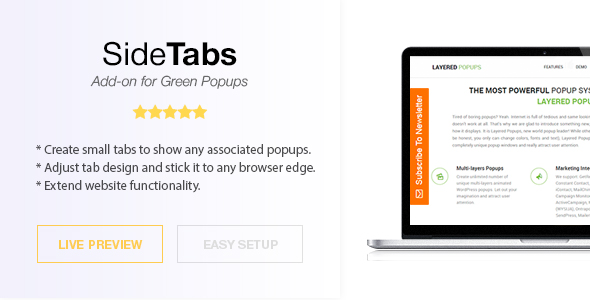
Side Tabs – Green Popups Add-On is a lightweight WordPress extension that lets you attach small, clickable tabs to any edge of your website window and link each one to an existing popup. Built by halfdata as an add-on for the Green Popups plugin, it turns a standard popup setup into a more visible, always-accessible opt-in system that visitors can trigger at any moment. Instead of relying solely on timed or scroll-triggered popups, you place a persistent tab on the side of the screen, and clicking it opens the associated popup. For marketers, bloggers, and agencies who already use Green Popups, this add-on is a simple way to extend functionality and capture more attention without redesigning a site.
Key Features
- Edge-anchored side tabs: Create small tabs and stick them to any window edge, giving visitors a permanent visual entry point to your popups.
- Popup association: Each tab is linked to an existing Green Popups popup, so clicking the tab instantly opens the connected offer, subscription form, or message.
- Multiple tabs support: Create as many side tabs as you need and manage them all from a dedicated admin panel.
- Sitewide or page-level display: Choose a tab to appear across the entire site from the Settings page, or assign a specific tab to individual posts and pages from the editor.
- Icon-only mode: Skip the tab label and display an icon only, which is useful for compact designs and mobile-friendly layouts.
- User role control: Disable tabs for certain user roles, so logged-in administrators or members don’t see prompts meant for new visitors.
- Multisite compatibility: Works with WordPress Multisite, making it suitable for networks of sites managed from a single installation.
- Advanced Targeting compatibility: Integrates with Green Popups’ Advanced Targeting, so tab behavior aligns with your existing targeting rules.
Who Is This For? Use Cases
Side Tabs – Green Popups Add-On is designed for anyone already running the Green Popups plugin who wants a more persistent, less intrusive way to surface popups. Because it depends on Green Popups version 7.0 or higher, the ideal user is someone with that plugin already installed and active.
Agencies and Freelancers
Agencies building conversion-focused sites for clients can use side tabs to keep key offers visible without disrupting the main layout. A single tab linked to a contact or lead-generation popup gives every page a consistent call to action, and the ability to assign tabs per page makes it easy to tailor campaigns across a client’s site.
Bloggers and Content Publishers
Bloggers can attach a subscribe tab to the side of the screen so readers always have a way to join a newsletter or follow a channel. Because the tab is small and out of the way, it doesn’t interrupt reading the way a full-screen popup can, which helps protect both user experience and engagement.
E-commerce and Promotional Sites
Online stores can use a side tab to promote a discount, seasonal offer, or loyalty signup. Linking the tab to a targeted popup means shoppers can open the promotion whenever they’re ready, rather than being interrupted mid-browse.
SaaS and Membership Sites
Product and membership sites can use side tabs to surface trial signups, feature announcements, or upgrade prompts. The user role option is particularly useful here, since it lets you hide promotional tabs from existing customers while showing them to visitors.
Developers and Site Builders
Developers who manage multiple WordPress installations, including Multisite networks, can deploy side tabs consistently across sites and control which tabs appear where through the standard WordPress editor and settings screens.
Technical Details & Compatibility
Side Tabs – Green Popups Add-On is a WordPress plugin distributed through CodeCanyon. It is an add-on rather than a standalone product, which means Green Popups version 7.0 or higher must be installed and active for it to function. Installation follows the standard WordPress process: download the plugin from CodeCanyon, install and activate it like any other plugin, and a new menu item appears under Green Popups >> Side Tabs.
From that menu, you create tabs and associate each one with an existing popup. Display is controlled in two ways: a global setting that selects a tab to appear sitewide, or a per-page and per-post selection made directly in the editor. This gives you granular control without touching code.
The add-on has been maintained across several releases. Version 1.44 added WordPress Multisite compatibility, version 1.46 fixed compatibility with Advanced Targeting, and version 2.00 updated the add-on to work with the newly renamed Green Popups plugin (formerly Layered Popups). These updates indicate ongoing maintenance and attention to compatibility with the parent plugin’s evolution.
Because the add-on relies on Green Popups for the popup content itself, browser compatibility, responsiveness, and performance characteristics largely follow those of the parent plugin. The side tab element is a small, lightweight UI component, so it adds minimal overhead to page load. As always, testing on your specific theme and hosting environment before going live is recommended.
Pros and Cons
Pros
- Affordable at $18.00, making it a low-risk addition for anyone already using Green Popups.
- Non-intrusive opt-in method that keeps offers visible without interrupting the reading or browsing experience.
- Flexible display control with both sitewide and per-page tab assignment.
- Multiple tabs and icon-only mode allow for tailored designs across different sections of a site.
- User role targeting helps you avoid showing promotional tabs to the wrong audience.
- Multisite support is a genuine advantage for agencies and network administrators.
- Actively maintained with a documented changelog and compatibility updates for the parent plugin.
Cons
- Requires Green Popups 7.0 or higher — it cannot be used as a standalone popup solution.
- Tab styling and behavior are tied to the Green Popups ecosystem, so design flexibility depends on the parent plugin.
- No rating data is listed on the product page, so buyers relying on reviews will need to evaluate based on the changelog and sales history instead.
- Advanced customization beyond the provided options may require familiarity with WordPress development.
Frequently Asked Questions
Do I need the Green Popups plugin to use Side Tabs?
Yes. Side Tabs – Green Popups Add-On is an add-on, not a standalone plugin. It requires Green Popups version 7.0 or higher to be installed and active. Without the parent plugin, the add-on has no popups to associate tabs with and will not function as intended.
Can I show different side tabs on different pages of my site?
Yes. You can select a tab to display sitewide from the Settings page, or assign a specific tab to an individual post or page using the editor. This makes it possible to run different offers or campaigns in different sections of the same website.
How do I install and set up Side Tabs?
Confirm that Green Popups 7.0 or higher is installed, then download Side Tabs from CodeCanyon and install and activate it as a regular WordPress plugin. Once activated, a new menu appears under Green Popups >> Side Tabs, where you can create tabs and link them to existing popups. The developer provides documentation covering setup and usage.
Final Verdict
Side Tabs – Green Popups Add-On solves a specific but valuable problem: how to keep popups accessible without forcing them on visitors. With 1,854 sales on CodeCanyon, it has clearly found an audience among Green Popups users who want a persistent, click-to-open opt-in element. Developer halfdata has maintained the add-on across multiple releases, adding Multisite support, user role controls, icon-only tabs, and compatibility with the parent plugin’s rebrand and Advanced Targeting features.
At just $18.00, it’s a modest investment for anyone already running Green Popups. The combination of sitewide and per-page control, multiple tab support, and role-based visibility gives site owners meaningful flexibility without requiring custom development. The main caveat is the dependency on Green Popups 7.0 or higher — if you’re not already using that plugin, this add-on isn’t for you. But if you are, Side Tabs is a practical, well-maintained way to extend your popup strategy.
If you want a low-cost, non-intrusive way to surface offers, subscriptions, and announcements across your WordPress site, Side Tabs – Green Popups Add-On is worth adding to your toolkit. Head to CodeCanyon, pick it up for $18.00, and start turning a simple side tab into a steady source of engagement.