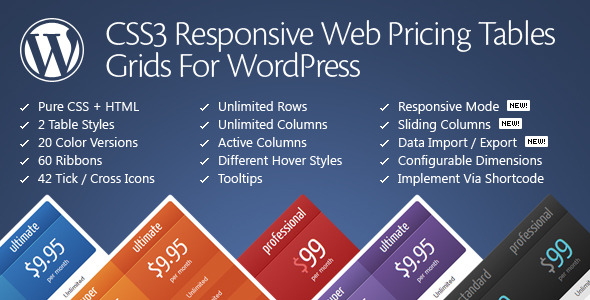
When it comes to presenting subscription plans, service packages, or product tiers on a WordPress site, clarity and visual appeal are paramount. Pricing Tables for WordPress by QuanticaLabs is a dedicated plugin designed to solve this exact challenge, offering a robust set of tools to create, customize, and display professional pricing tables without needing to write a single line of code. Built for website owners, developers, and agencies alike, this plugin leverages pure CSS3 and HTML to deliver fast, responsive tables that can be configured in minutes. With over 11,000 sales and a reputation for reliable support, it stands out as a mature, trusted solution in the CodeCanyon marketplace.
Key Features
- Intuitive Admin Panel with Live Configuration: The plugin’s backend dashboard allows you to build and preview your pricing table in real-time. Most users can have a fully functional table ready within 2–5 minutes, drastically reducing setup time compared to manual coding.
- Two Distinct Table Styles and 20 Predefined Color Versions: Choose from two core design layouts and instantly apply one of 20 color schemes. This flexibility ensures the plugin can match a wide range of brand aesthetics without requiring custom CSS.
- Comprehensive Responsive Mode Configurator: You can enable a dedicated responsive mode and set your own breakpoints, column widths, and font sizes for each device step. This granular control ensures your tables look flawless on desktops, tablets, and smartphones.
- Sliding Columns and Expandable Rows: Add interactive elements to your tables. The sliding columns feature allows columns to move on user interaction, while expandable rows let you show or hide detailed information, keeping the initial layout clean and scannable.
- Active (Popped-Up) Columns and Hover States: Highlight a specific column, such as a recommended or premium plan, by setting it as active or “popped-up.” You can also enable or disable hover effects for columns to improve user experience.
- Extensive Customization Options: Control column widths in pixels or percentages, adjust row heights and padding, configure text alignment, and sort rows and columns. The plugin also includes 42 tick/cross icons and 60 ribbon styles to denote features or promotions.
- Elementor and WPBakery Page Builder Support: Dedicated widgets are available for both Elementor and WPBakery Page Builder, allowing you to insert and manage pricing tables directly within your page builder interface.
- Import/Export Functionality: Save your table configurations and data as files. This is particularly useful for developers who need to replicate setups across multiple client sites or for backing up complex table structures.
- Shortcode-Based Implementation: Each table is generated with a simple shortcode (
[css3_grid]), making it easy to insert into any page, post, or widget area on your WordPress site.
Who Is This For? Use Cases
Agencies and Web Developers
For agencies managing multiple client websites, the ability to quickly create branded and responsive pricing tables is a major time-saver. The import/export feature and support for multisite (WordPress MU) environments allow developers to build a template once and deploy it across numerous projects. The dedicated Elementor and WPBakery components further streamline workflow for teams using these page builders.
SaaS and Subscription-Based Businesses
Companies offering tiered subscription plans—such as software-as-a-service platforms, membership sites, or hosting providers—will find the plugin’s feature set essential. The ability to highlight a recommended plan with a popped-up column, use ribbons for promotional badges, and include tooltips for feature explanations helps convert visitors into paying customers.
Freelancers and Small Business Owners
Freelancers selling packages (e.g., web design, marketing, consulting) can present their service tiers professionally without hiring a designer. The live admin panel and 20 color presets make it easy to create a table that aligns with a personal brand. The low price point of $27.00 provides excellent value for a single investment that covers unlimited use on one site.
E-commerce and Product Comparison Sites
While primarily designed for pricing, the plugin’s column and row structure can be adapted for product comparisons. The expandable rows feature is particularly useful for showing detailed specifications or reviews without overwhelming the initial view, making it a versatile tool for comparison pages.
Technical Details & Compatibility
Pricing Tables for WordPress is built on a foundation of pure CSS3 and HTML, ensuring lightweight performance and broad compatibility. The plugin supports WordPress Multisite (WordPress MU) out of the box, allowing it to be activated across an entire network of sites. Browser support is comprehensive, with full functionality in Firefox 3.5+, Opera 11+, Safari 5+, Chrome, and Internet Explorer 9 and above. Note that IE6–8 do not support rounded corners and shadows, which may affect the visual presentation on older browsers.
The plugin integrates seamlessly with major page builders through dedicated widgets for Elementor and WPBakery Page Builder. It also provides a standard shortcode for users who prefer the classic editor or Gutenberg. The admin panel includes a live configuration preview, meaning you can see changes as you make them without reloading the page. For developers, the ability to import and export configuration settings as files simplifies migration and backup processes.
Performance is a priority: the plugin loads its files only when a pricing table is present on the page, preventing unnecessary bloat on other pages. The plugin is regularly updated, with the latest version (v11.8) released on 4 August 2025, reflecting ongoing maintenance and feature improvements by QuanticaLabs.
Pros and Cons
Pros
- Fast Setup: The live admin panel and 20 sample configurations allow you to create a professional table in under five minutes.
- Highly Customizable: With options for column widths, font sizes, colors, ribbons, icons, and responsive breakpoints, you have granular control over every visual element.
- Page Builder Integration: Dedicated Elementor and WPBakery components make it easy for users of those builders to add tables without touching shortcodes.
- Proven Track Record: With over 11,000 sales and a long history of updates, this is a mature, stable plugin backed by an experienced developer.
- Excellent Value: At $27.00 for a regular license, the plugin offers a rich feature set at a competitive price point.
- Interactive Features: Sliding columns, expandable rows, and hover states add dynamic elements that can improve user engagement and conversion rates.
Cons
- No Support for Internet Explorer 6–8: While these browsers are largely obsolete, users with legacy systems may see visual inconsistencies, particularly with rounded corners and shadows.
- Learning Curve for Advanced Options: While basic setup is quick, mastering all customization options—such as responsive breakpoints and font configurations—may require reviewing the included documentation.
- Design Limitations: The plugin offers two table styles and 20 color presets. While flexible, it may not satisfy users seeking highly unconventional or bespoke table designs without custom CSS.
- Single-Site License: The regular license covers use on one end product. Agencies managing multiple client sites will need to purchase separate licenses or consider an extended license for distribution.
Frequently Asked Questions
Does Pricing Tables for WordPress work with the Gutenberg block editor?
Yes. While the plugin does not include a dedicated Gutenberg block, it generates a standard shortcode ([css3_grid]) that can be inserted into any Gutenberg page or post using the Shortcode block. The plugin is fully compatible with the Gutenberg editor and WordPress 5.0 and above.
Can I import a pricing table configuration from one WordPress site to another?
Absolutely. The plugin includes an import/export feature within its admin panel. You can export your table’s settings and data as a file from one site and then import it into another. This is especially useful for developers who need to replicate tables across multiple client projects or for backing up complex configurations.
Is the plugin responsive on mobile devices?
Yes. Pricing Tables for WordPress includes a dedicated responsive mode configurator. You can enable responsive behavior and set your own breakpoints, column widths, and font sizes for different screen sizes. This ensures your tables adapt correctly to smartphones, tablets, and desktops without breaking the layout.
Final Verdict
Pricing Tables for WordPress by QuanticaLabs is a proven, feature-rich solution for anyone needing to display pricing or comparison tables on a WordPress site. With over 11,000 sales, consistent updates, and a developer known for responsive support, it offers a level of reliability that newer plugins often lack. The combination of a live admin panel, two design styles, 20 color presets, and deep customization options—including responsive breakpoints and page builder integration—makes it suitable for freelancers, agencies, and businesses of all sizes. At $27.00, it delivers exceptional value for a tool that can directly impact conversion rates by presenting your offers clearly and attractively.
If you are looking for a pricing table plugin that balances ease of use with advanced features, this is a strong contender. The ability to create a polished, responsive table in minutes, backed by a developer with years of Envato marketplace experience, makes it a safe and smart investment. Purchase Pricing Tables for WordPress today and start building tables that convert visitors into customers.