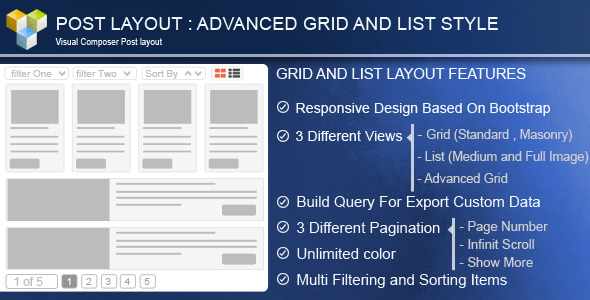
The Advance Post Grid/List with custom filtering for Visual Composer is a specialized WordPress add-on designed to transform the standard content display capabilities of the popular Visual Composer (now WPBakery) page builder. Developed by proword, this plugin provides a comprehensive solution for creating dynamic, highly customizable post grids and lists that feature advanced filtering, sorting, and responsive layout controls. It is specifically engineered for developers, site owners, and content managers who need to present large volumes of posts, custom post types, or portfolio items in a clean, user-friendly manner without relying on complex custom code. This tool elevates the standard post display into a fully interactive content hub, making it a valuable asset for news sites, blogs, and business portfolios.
Key Features
This plugin is packed with features aimed at providing granular control over how your content is displayed and filtered. Below is a breakdown of its core capabilities that justify its utility for any WordPress project.
- Advanced Grid Options: Choose from three distinct grid types, including Standard (fixed row), Advanced Grid (Mixitup), and Masonry layouts. This flexibility allows you to match the visual style to the specific needs of your content, whether it is a corporate blog or a creative portfolio.
- Responsive Column Control: The plugin provides three separate fields to control the count of columns for Desktop (PC), Tablet, and Mobile modes. This ensures your layout looks pixel-perfect on any device without needing custom CSS media queries.
- Dual Grid Skin System: The “Skin One” option offers a drag-and-drop teaser layout builder, allowing for unlimited combinations of image, text, and meta elements. The “Skin Two” option provides multi-preset styles and effects, offering a quick way to apply professional styling without manual configuration.
- Versatile List Types: Switch between a list with a medium image or a large image. This is ideal for editorial-style content where the image-to-text ratio matters for readability and engagement.
- Custom Taxonomy Filtering: The core of the plugin lies in its ability to use any custom taxonomy for filters. This goes beyond standard categories and tags, allowing you to filter products, portfolio types, or any custom data structure you have created.
- Powerful Query Builder: You can select data sources from posts, custom posts, or pages. The builder allows you to set the number of items, order by parameters, and filter by categories, tags, taxonomies, individual posts, or even specific authors.
- Multiple Pagination Styles: Choose between no pagination, a “Show More” button, infinite scroll, or standard page numbers. This gives you full control over user navigation and site performance.
- AJAX Grid/List Switching: Users can switch between grid and list views without refreshing the page via an AJAX switch icon. This interactive feature improves user experience by allowing them to choose their preferred content format instantly.
- Display Control Options: The plugin offers extensive control over metadata, including the ability to show/hide excerpts, authors, post dates, comment numbers, and meta tags (tags/categories/taxonomies).
Who Is This For? Use Cases
The Advance Post Grid/List with custom filtering for Visual Composer is not a one-size-fits-all tool; it is a specialized solution that serves specific types of users and website architectures. Here are the primary groups that will benefit the most from its implementation.
Content-Rich Blogs and News Portals
For publishers who deal with hundreds of articles, the ability to filter content by category, tag, or author is crucial. This plugin allows you to create a dynamic archive page where readers can instantly filter news by topic without loading a new page. The multiple pagination options, such as infinite scroll, keep readers engaged and reduce bounce rates, which is critical for news and magazine websites.
Portfolio and Creative Agencies
Creative professionals need to showcase work in a visually appealing way. The Masonry and Advanced Grid (Mixitup) options provide a modern, dynamic aesthetic that is perfect for portfolios. By utilizing custom taxonomies, agencies can allow potential clients to filter projects by service type, industry, or even the technology used. The “Skin Two” effects add a layer of polish that makes the portfolio feel interactive and high-end.
E-commerce and WooCommerce Stores
While this is not a replacement for a full WooCommerce shop page, it can be used effectively for promotional blocks. The plugin’s query builder can fetch products and display them in a grid with filtering by specific taxonomies. This is particularly useful for creating “Featured Products” or “Deal of the Day” sections that can be filtered by attributes, providing a rich shopping experience without sending users away from the page.
Developers and Site Builders
For developers who use Visual Composer to speed up their workflow, this plugin removes the need for extensive custom PHP queries. The drag-and-drop teaser layout builder in “Skin One” allows for rapid prototyping of complex layouts. The ability to control column counts across devices also saves significant development time that would otherwise be spent on responsive CSS fixes.
Technical Details & Compatibility
Before making a purchase, it is essential to understand the technical environment required to run this plugin effectively. The product is designed to integrate seamlessly with the Visual Composer ecosystem, and its development history indicates a strong commitment to maintaining compatibility with the page builder’s updates.
Primary Requirement: The plugin requires Visual Composer to function. It is an add-on, not a standalone solution. The changelog confirms compatibility with Visual Composer versions up to 5.2.x and the new version of VC (as of the 4.0 release), indicating the author is proactive in fixing compatibility issues as they arise.
WordPress and Plugin Compatibility: The plugin supports a wide range of WordPress features, including custom post types and custom taxonomies. It is fully compatible with WPML. This is a critical feature for multilingual sites, allowing you to translate the filter terms and other interface elements to match your site’s language.
Responsive Design: The plugin is built with a responsive layout and offers specific column count controls for desktop, tablet, and mobile. This ensures that the grids and lists render correctly on all screen sizes, which is a baseline requirement for modern SEO and user experience.
Performance Considerations: The plugin offers several pagination types, including AJAX-driven options like infinite scroll and “Show More” buttons. These methods can help improve perceived performance by loading content in chunks rather than all at once. The AJAX grid/list switching also prevents full page reloads, contributing to a faster, smoother browsing experience.
Pros and Cons
To provide a balanced view, it is important to weigh the strengths of this plugin against its limitations. This helps ensure that you are making an informed decision based on your specific project needs.
Pros
- Deep Filtering Capabilities: The ability to filter by any custom taxonomy is a standout feature that offers flexibility that many free grid plugins lack.
- Extensive Customization: With two skin types, border options, icon effects, and 500+ Google Fonts for titles and excerpts, the design control is extensive.
- Strong Value for Price: At $25.00, this plugin offers a significant return on investment for the level of functionality it provides, especially when compared to the cost of custom development.
- Proven Track Record: With over 2,475 sales, the plugin has a substantial user base, indicating reliability and community trust in the author, proword.
- Multilingual Ready: Full WPML support ensures that your global audience can use the filters in their native language, which is essential for international reach.
Cons
- Dependency on Visual Composer: The plugin is useless without the Visual Composer page builder. This is a lock-in that may not be ideal for users looking to switch to Gutenberg or other builders in the future.
- Potential Learning Curve: While the drag-and-drop builder is intuitive, the sheer number of options (grid types, skin types, effects) may be overwhelming for beginners who just want a simple post list.
- Mixed Compatibility Updates: While the developer has been diligent with updates, the gaps between some updates (e.g., from 2017 to 2019) could be a concern for users who rely on the absolute latest version of WordPress or Visual Composer immediately upon release.
Frequently Asked Questions
Here are answers to common questions potential buyers have when considering this plugin for their WordPress environment.
Does this plugin work with the latest version of WordPress and Visual Composer?
Yes, the developer has a history of releasing updates to ensure compatibility. The changelog shows specific fixes for “Compatible with New version of VC” in version 4.0 (released 05-09-2019) and updates for Visual Composer 5.2.x in version 3.8. While you should always check the latest changelog on the CodeCanyon page for the most current compatibility status, the author has been proactive in patching issues when the page builder updates.
Can I use this plugin to display and filter WooCommerce products?
Yes, you can. The plugin’s “Build Query” feature allows you to select “Products” as a data source if you have WooCommerce installed. You can then filter these products by their standard categories or tags. However, for advanced filtering by attributes like size or color, you would need to ensure those attributes are registered as custom taxonomies, which the plugin supports.
Is the plugin translation-ready for multilingual websites?
Absolutely. The plugin includes specific support for WPML, and the changelog confirms updates for “WPML Support & Language File” and “Read More Translate”. This means you can translate the “Read More” button text and other front-end elements using the WPML interface, making it a reliable choice for multilingual content strategies.
Final Verdict
The Advance Post Grid/List with custom filtering for Visual Composer stands out as a robust and flexible tool for anyone heavily invested in the Visual Composer ecosystem. Its primary strength lies in the advanced filtering capabilities, which allow you to turn a simple archive page into a dynamic, interactive experience for your users. The combination of two distinct grid skins, responsive controls, and multiple pagination styles provides a level of detail that is rarely found in standard free widgets.
With over 2,475 sales, proword has established a reputation for delivering a functional product that meets the needs of a wide audience. The plugin’s history of updates, particularly regarding compatibility fixes, demonstrates a commitment to maintaining the product’s integrity. For a one-time price of $25.00, it offers a cost-effective alternative to hiring a developer to build custom query and filter systems. If you are looking to enhance your site’s content presentation and user navigation, this plugin is a reliable and powerful choice.
Ready to take your content display to the next level? Click the button below to purchase the Advance Post Grid/List with custom filtering for Visual Composer and start building dynamic, filterable content layouts today.