CSS image effects are the secret weapon for transforming static website visuals into dynamic, interactive elements that capture attention and guide user experience. For WordPress site owners, designers, and developers sourcing assets from marketplaces like ThemeForest and CodeCanyon, mastering these effects is the difference between a functional site and a memorable brand experience. This deep dive goes beyond basic filters, exploring the practical implementation of advanced CSS techniques that can be integrated into premium themes and plugins to elevate any project, from portfolios to e-commerce stores.
Key Features of Advanced CSS Image Effects
Modern CSS provides a robust toolkit for image manipulation directly in the browser, eliminating the need for heavy image editing software for every visual tweak. When evaluating a premium WordPress theme or a dedicated image effects plugin, look for these powerful capabilities:
- CSS Filter Functions: The
filterproperty is a game-changer, allowing real-time adjustments like blur, grayscale, sepia, brightness, contrast, and hue-rotation. These can be combined for complex, custom looks. - Blend Modes & Overlays: Using
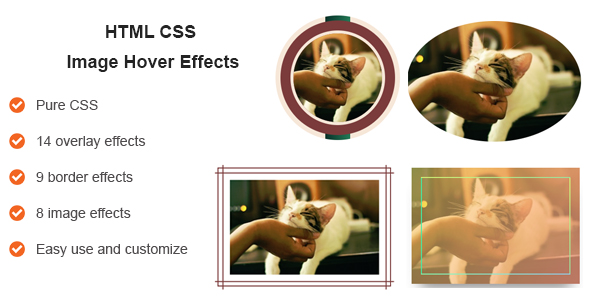
mix-blend-modeandbackground-blend-mode, images can interact creatively with underlying colors or other elements, creating duotones, color burns, and sophisticated compositional effects. - Advanced Hover & Transition Effects: This is where interactivity shines. Effects can include zoom on hover, color restoration on mouseover (from grayscale to color), elegant caption overlays that slide or fade in, and subtle shadow animations that give depth.
- Clip-Path & Shape-Outside: Move beyond rectangular images. The
clip-pathproperty lets you mask images into circles, polygons, or custom SVG shapes, whileshape-outsidecan make text flow around those shapes. - CSS Grid & Flexbox Integration: True power comes from combining visual effects with modern layout systems. A gallery built with CSS Grid can have individual items that apply unique filters or transforms, creating a cohesive yet varied visual narrative.
- Performance-Centric Design: Well-coded effects leverage hardware acceleration (using properties like
transformandopacity) to ensure smooth animations that don’t bog down page speed—a critical ranking factor. - Custom Property (CSS Variable) Support: Top-tier themes allow you to control effect intensity—like blur radius or saturation—through globally defined CSS variables, making site-wide styling adjustments effortless from a single stylesheet.
Who Is This For? Use Cases
The application of professional-grade CSS image effects spans virtually every niche. They are not merely decorative but serve strategic UX and branding purposes.
E-Commerce & Product Showcase Websites
For online stores on platforms like WooCommerce, images are the primary salesperson. Hover effects that provide a quick zoom or a 360-degree view simulation build user confidence. Using a subtle grayscale-to-color transition on product thumbnails can direct focus to featured items or new arrivals, significantly boosting engagement and conversion rates.
Photography Portfolios & Creative Agencies
For creatives, the website itself must be a testament to their skill. A masonry grid where each image thumbnail uses a unique clip-path shape or a dynamic blend mode on hover creates an immersive, gallery-like experience. It demonstrates technical artistry and keeps potential clients exploring the portfolio longer.
News, Magazine, & Blog Platforms
Content-heavy sites use image effects to establish visual hierarchy and tone. Applying a consistent sepia filter to historical article features, or a bright, high-contrast look for modern tech news, helps categorize content subconsciously for readers. Featured post images with elegant overlay captions that appear on hover can increase click-through rates.
Landing Pages & SaaS Product Sites
These sites need to explain complex value propositions quickly. Using a targeted blur effect on background hero images keeps the focus on the headline and CTA button. Animated screenshots of a software dashboard with a perspective tilt effect and a soft drop-shadow can make the product feel more tangible and interactive even in a static presentation.
Technical Details & Compatibility
Implementing these effects successfully requires attention to technical foundations. Core CSS properties like filter, clip-path, and mix-blend-mode are now widely supported in all modern browsers (Chrome, Firefox, Safari, Edge). However, for full backward compatibility, especially with older versions of Internet Explorer, a robust WordPress theme or plugin will include fallback styles or use feature detection libraries.
Performance is paramount. Effects should be applied via CSS rather than by manually editing and uploading multiple image files, as this reduces server load and HTTP requests. The most efficient effects use the GPU via properties like transform: translateZ(0) or will-change for complex animations. Always ensure the base image is optimized for web (correct format, compressed size) before any CSS effect is applied, as no effect can fix a fundamentally slow-loading asset.
Integration with popular page builders like Elementor, WPBakery, or Beaver Builder is a key consideration. Premium solutions often provide dedicated modules or widgets with pre-styled effect options, allowing non-coders to achieve professional results through a simple interface. Check for compatibility with your specific stack before purchase.
Pros and Cons
Pros
- Enhanced Performance: CSS effects are processed client-side, reducing server processing time and bandwidth compared to pre-rendered, edited images.
- Unmatched Flexibility & Consistency: Change the look of every image on your site by modifying a few lines of CSS, ensuring a perfectly uniform style across all pages.
- Improved User Experience (UX): Interactive hover states and animations provide immediate visual feedback, making navigation more intuitive and engaging.
- Lightweight Implementation: No mandatory external JavaScript libraries are needed for core filter and transform effects, keeping page weight down.
- Future-Proof & Scalable: As CSS standards evolve, these native effects are updated by the browser, ensuring your site benefits from performance and feature improvements over time.
Cons
- Browser Support Variations: While excellent in modern browsers, some advanced effects (like certain blend modes) may have partial or no support in older ones, requiring fallback plans.
- Learning Curve for Customization: To move beyond pre-built theme options, a working knowledge of CSS is required to craft truly unique effects.
- Potential for Overuse: It’s easy to get carried away. Excessive animations or intense filters can distract from content, harm accessibility, and appear unprofessional.
- Performance Cost if Misused: Poorly coded animations (e.g., animating the
marginorwidthproperty instead oftransform) can trigger heavy browser reflows, leading to a janky experience on lower-powered devices.
Frequently Asked Questions
Will using CSS image effects slow down my WordPress site?
When implemented correctly, CSS effects have a minimal performance impact. The key is to use GPU-accelerated properties (like transform and opacity) for animations and to always start with well-optimized image files. A premium theme or plugin built with performance in mind will handle this optimization for you. The speed cost is almost always far lower than that of loading multiple pre-filtered image files or heavy JavaScript libraries.
Are these effects compatible with page builders and e-commerce plugins like WooCommerce?
High-quality themes and dedicated effect plugins from markets like ThemeForest are specifically designed for seamless integration with the WordPress ecosystem. They typically include dedicated styling for WooCommerce product galleries, compatibility snippets for major page builders, and shortcodes you can use anywhere. Always check the item’s documentation and “compatible with” list before purchasing to confirm it works with your specific setup.
Do I need to know how to code to use advanced CSS image effects?
Not necessarily. Many premium WordPress themes come with a suite of pre-designed image hover effects, gallery styles, and filter options that can be applied through the WordPress Customizer or your page builder’s visual interface. However, to unlock the fullest potential and create completely custom effects, a foundational understanding of CSS will be required. Most top authors provide clear documentation and CSS snippets to help you customize their products.
Final Verdict
Mastering CSS image effects is a non-negotiable skill in modern web development, transforming static content into a dynamic conversation with your audience. For WordPress professionals, leveraging a well-coded theme or dedicated plugin from a reputable marketplace is the fastest path to implementing these effects reliably and at scale. The right tool not only provides stunning out-of-the-box styles but also the clean, extensible code foundation needed for custom work.
The evidence is in the numbers: top-selling visual effect themes and plugins on ThemeForest and CodeCanyon boast thousands of sales, backed by high ratings and active support forums. This social proof underscores their value in real-world projects. Investing in a robust solution saves countless hours of cross-browser testing and performance tuning, allowing you to focus on design and content.
Ready to elevate your site’s visual narrative? Don’t just decorate—communicate and convert. Explore the curated selection of premium WordPress themes and plugins specializing in CSS image effects. Look for items with detailed demos, comprehensive documentation, and positive reviews about support. Choose a tool that aligns with your technical comfort level and project goals, and start implementing the engaging, performant visuals that today’s users expect and that search engines reward.