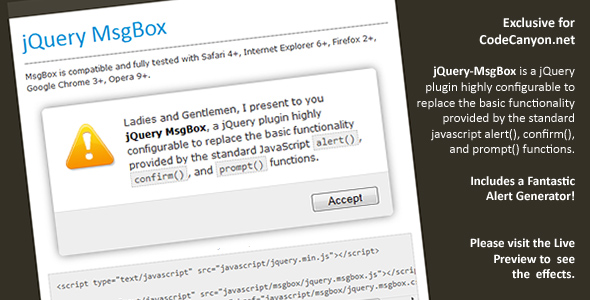
jQuery MsgBox is a lightweight, highly configurable jQuery plugin built to replace the plain, browser-native alert(), confirm(), and prompt() dialog boxes with something far more polished and controllable. Developed by aeroalquimia and sold on CodeCanyon, this small but practical script gives front-end developers a drop-in way to display alerts, confirmation prompts, and input requests without being stuck with the default browser popups that look different on every platform and offer almost no styling options. With more than 1,600 sales, it has become a quietly reliable utility for developers who want better-looking dialogs without adding a heavy UI framework to their projects.
Key Features
- Replaces native JavaScript dialogs — jQuery MsgBox swaps out the standard alert(), confirm(), and prompt() functions with customizable, styled alternatives that behave consistently across browsers.
- Highly configurable — Nearly every aspect of the dialog can be adjusted through configuration options, letting developers match the plugin to their site’s design language rather than the other way around.
- Fantastic Alert Generator — The package includes a built-in alert generator, which helps developers preview and build out alert configurations quickly instead of guessing at option values.
- Form options support — Added in version 1.3, form options allow the prompt-style dialogs to handle input in more flexible ways, extending the plugin beyond simple text prompts.
- Enter key to close — Since version 1.1, users can dismiss an alert by pressing [Enter], a small usability touch that makes the dialogs feel more natural.
- Config function — Version 1.1 introduced a dedicated config function, giving developers a cleaner way to set global or reusable dialog behavior.
- Lightbox-style presentation — The plugin’s visual approach aligns with lightbox patterns, overlaying the page with a focused, modal-style message box rather than interrupting the flow with a system dialog.
- Actively maintained changelog — Multiple versioned releases (1.0 through 1.3) show a documented history of fixes and improvements rather than a set-and-forget script.
Who Is This For? Use Cases
jQuery MsgBox targets anyone building web interfaces where user feedback, confirmation, or input collection matters — and where the default browser dialogs simply aren’t good enough. Its small footprint and dependency on jQuery make it especially appealing to developers working within existing jQuery-based codebases.
Front-End Developers and jQuery Users
If your project already loads jQuery, adding jQuery MsgBox is a natural fit. You get styled alert, confirm, and prompt dialogs without pulling in a large component library or rewriting your existing event handlers. The config function and generator make it quick to standardize dialog behavior across an entire site.
Agencies and Freelancers
Agencies building client sites often need consistent, branded user feedback. Native browser popups undermine that polish because they render differently on Chrome, Firefox, and Safari. jQuery MsgBox gives freelancers and agencies a low-cost way to deliver a more cohesive experience, and the $6.00 price point makes it an easy line item on any project.
Web Application Builders
Applications that rely on confirmations — deleting a record, submitting a form, confirming a destructive action — benefit from dialogs that can be styled and configured. The form options added in version 1.3 extend this further for input-driven workflows.
Bloggers and Small Site Owners
Even simple sites occasionally need a confirmation or notice. jQuery MsgBox offers a lightweight path to better dialogs without requiring a full theme overhaul or a modern JavaScript framework.
Developers Modernizing Legacy Code
Older codebases are full of raw alert() and confirm() calls. jQuery MsgBox is designed specifically to replace those calls, making it a practical refactoring tool for legacy jQuery projects that still need to look current.
Technical Details & Compatibility
jQuery MsgBox is a JavaScript plugin built on jQuery, distributed through CodeCanyon’s JavaScript and Miscellaneous categories. It is framework-agnostic in the sense that it works anywhere jQuery runs — WordPress themes, custom PHP applications, static sites, or single-page setups that still use jQuery.
- Dependency: Requires jQuery. Version 1.2 specifically addressed a bug where isPlainObject did not exist in jQuery 1.3, indicating the plugin was tested against early jQuery releases and maintained for compatibility as jQuery evolved.
- Browser support: Version 1.3 included a fix for Safari buttons, confirming the developer actively tested across major browsers including Safari, Chrome, and Firefox.
- Mobile responsiveness: Because the dialogs are rendered as lightbox-style overlays in the page rather than native system popups, they inherit the responsiveness of your own CSS and layout.
- Performance: As a small jQuery plugin, the overhead is minimal compared to full UI libraries. There is no heavy framework to load and no build step required.
- Update history: The changelog spans versions 1.0 through 1.3, released between March and June 2010, with each release adding features or fixing reported bugs. This documented maintenance record signals a developer who responds to issues.
- Integration: Since it replaces standard JavaScript dialog functions, it can be dropped into existing code with minimal changes to surrounding logic.
Pros and Cons
Pros
- Extremely affordable at just $6.00, making it one of the lowest-risk purchases on CodeCanyon.
- Proven track record with over 1,600 sales, indicating broad real-world use and community trust.
- Directly replaces native dialogs, so adoption requires minimal changes to existing code.
- Highly configurable, with a config function and an included alert generator to speed up setup.
- Documented bug fixes for Safari buttons and jQuery 1.3 compatibility show genuine maintenance.
- Usability touches like Enter-to-close make the dialogs feel more polished than browser defaults.
- Lightweight — no large dependencies beyond jQuery itself.
Cons
- Requires jQuery, so projects built entirely on modern vanilla JavaScript or frameworks like React and Vue would need jQuery added or a different solution.
- Last documented update is version 1.3 (June 2010), meaning the plugin reflects an earlier era of web development. It may need review before use in modern stacks.
- No rating data is shown in the listing, so buyers relying on star ratings alone won’t find that signal here — the sales count is the stronger indicator.
- Limited to the alert, confirm, and prompt paradigm — it is not a full modal or dialog framework, so complex UI needs may require something larger.
Frequently Asked Questions
Does jQuery MsgBox work with modern jQuery versions?
The plugin was maintained through version 1.3 and specifically fixed a compatibility issue with jQuery 1.3 (the isPlainObject bug in version 1.2). It was built for the jQuery ecosystem of that era. If you are running a very recent jQuery release, it is worth testing in your environment before deploying to production, since the last documented update predates many modern jQuery changes.
Can I customize the appearance of the alert, confirm, and prompt boxes?
Yes. jQuery MsgBox is described as highly configurable, and version 1.1 introduced a dedicated config function for managing dialog behavior. The included Alert Generator is specifically designed to help you preview and configure alerts, which makes styling and option tuning far more practical than editing code blindly.
Is jQuery MsgBox a one-time purchase, and what does it cost?
jQuery MsgBox is sold on CodeCanyon for $6.00 as a regular license purchase, which is a one-time cost rather than a subscription. As with all CodeCanyon items, the license terms govern how you can use it across projects, so review the standard license details on the product page if you plan to deploy it for multiple clients.
Final Verdict
jQuery MsgBox earns its place as a dependable utility plugin for developers who want better dialogs without a heavy dependency. Created by aeroalquimia and backed by over 1,600 sales on CodeCanyon, it has clearly solved a real problem for a large number of buyers: replacing the ugly, inconsistent native browser alert, confirm, and prompt boxes with something configurable and controllable. The changelog shows four documented releases with genuine bug fixes — Safari button rendering and jQuery 1.3 compatibility among them — which is exactly the kind of maintenance history you want to see before spending money on a script.
At $6.00, the risk is close to zero. If your project runs on jQuery and you want cleaner user feedback dialogs, the alert generator alone saves enough setup time to justify the price. The main caveat is age: the last documented update was in 2010, so buyers working in modern JavaScript environments should confirm compatibility in their own stack. For jQuery-based sites, legacy applications, and client projects where polished dialogs matter, jQuery MsgBox remains a smart, low-cost upgrade. Head to the CodeCanyon listing, check the live preview, and see how quickly it slots into your next build.