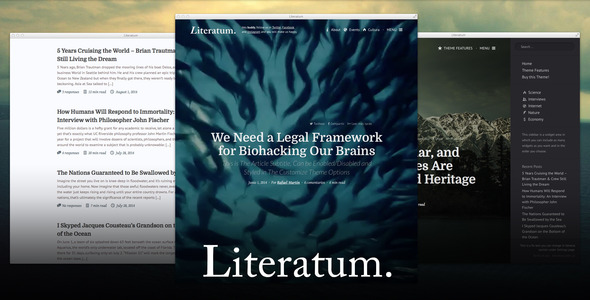
Literatum – Just Write is a WordPress theme built for one purpose: keeping readers focused on the words. Developed by RafaelMartin for the ThemeForest marketplace, it strips away visual noise and delivers a minimal, typography-driven reading experience for writers, bloggers, online journals, and digital magazines. With more than 1,500 sales to date, it has become a proven choice for publishers who want their articles to feel like literature rather than a content feed. Whether you run a personal blog, an interview series, or a full editorial magazine, Literatum gives you native WordPress controls, AJAX-powered navigation, and a template system flexible enough to shape every section of your site without touching a single line of code.
Key Features
- One-click AJAX navigation — Activate dynamic, app-like page transitions from the theme settings to speed up browsing and make navigation feel instant across the entire site.
- Automatic read time — Literatum counts the words in every article and displays an estimated reading time, giving visitors a clear idea of how long each piece will take before they commit.
- Multi-author support — Attribute posts to more than one author, with labels rendered cleanly as a single “By” prefix followed by each name.
- Custom template system — Templates are interchangeable between WordPress objects such as posts, pages, users, and categories, and each one carries its own options inside Appearance → Customize. You can even assign a specific template to an individual post.
- Interview support — Convert any article into a formatted interview using dedicated question-and-answer buttons that appear directly in the content editor.
- Video covers for posts — Replace a post’s featured image with a video, including YouTube URLs, integrated with native WordPress video support.
- Category templates and featured category images — Link an image to each category for display at the top of the archive, and choose between layouts such as a simple article list, a three-column grid, or masonry columns.
- Custom author avatars and contact fields — Every author can upload an avatar and add Twitter and Facebook usernames from the admin area, which also feed into social sharing.
- Third-party comments — Built-in integration for Disqus and Facebook Comments alongside the native WordPress comment system.
- Social sharing and SEO metadata — Posts output OpenGraph and Twitter Card metadata, with per-network share toggles for X, Facebook, Pocket, WhatsApp, Telegram, and a native mobile share trigger.
- Typography and color systems — Define typefaces and sizes for core elements from a single panel, and apply color schemes to keep the design consistent site-wide.
- Format tags in titles and subtitles — Apply formatting to post titles and subtitles, with inline editing support in the Gutenberg block editor.
- 400+ icon typeface and custom CSS field — Import icons as text and override any element’s styling through a dedicated CSS field in the admin.
- Aesop Story Engine compatibility — Pair Literatum with Aesop to build parallax content, full-width media, podcasts, chapters, and timelines.
- Translation ready — Ships with English and Spanish, plus .po and .mo files for translating into any language.
Who Is This For? Use Cases
Writers, Bloggers, and Personal Publishers
Literatum – Just Write was designed around the reading experience, which makes it a natural fit for essayists, novelists, and independent bloggers. The clean layout, refined typography controls, and automatic read time put the text first, while subtitles and formatted titles let you build a distinct editorial voice without a designer.
Online Magazines and News Publications
Editorial teams running a magazine or news site benefit from the category template system, featured category images, and multi-author attribution. You can give long-form features one layout, interviews another, and short news items a compact grid — all managed from the WordPress Customizer.
Interview-Based and Storytelling Sites
Publications built around conversations get dedicated interview controls that format questions and answers directly in the editor. Combined with Aesop Story Engine compatibility, the theme supports immersive, scroll-driven storytelling with parallax sections and embedded media.
Agencies and Freelance Developers
Because configuration relies on native WordPress functions rather than a proprietary panel, agencies can hand off sites that clients already know how to manage. The custom CSS field, per-template options, and interchangeable templates make it practical to reuse Literatum across multiple client projects.
Beginners and Advanced WordPress Users
The theme deliberately avoids complex third-party configuration panels that tend to become obsolete. Options live in Appearance → Customize, so newcomers can work visually while experienced developers still have granular control over templates, typography, and styles.
Technical Details & Compatibility
Literatum is a self-hosted WordPress theme that integrates with core WordPress functionality rather than replacing it. All primary settings are located in Appearance → Customize, with additional toggles under Theme Features and a Social Media panel in the admin. The theme is compatible with the Gutenberg block editor, including inline editing for formatted titles and subtitles, and has been actively maintained through modern WordPress releases — recent updates in the 2.2.x line address Gutenberg iframe contexts, block-editor save synchronization, and REST meta registration for formatted title fields.
On the technical side, the theme has moved its Sass workflow to Dart Sass, replaced deprecated division syntax with modern math.div() utilities, and rebuilt its compiled stylesheets for forward compatibility. The framework bootstrap was relocated to run earlier in the WordPress lifecycle for better compatibility with current PHP and WordPress versions, and a theme.json file was added for block-editor alignment. AJAX navigation includes hardened link handling that skips admin, login, and API routes, ignores hash-only jumps and static files, and falls back to standard navigation if a page load fails — preventing indefinite loading states.
Literatum is fully responsive and adapts articles to any screen size without sacrificing legibility. It supports paginated posts, Jetpack carousel and galleries, and Social Warfare, and it outputs social metadata for Facebook and Twitter Cards. Third-party comment systems include Disqus and Facebook Comments. Note that Aesop Story Engine compatibility is confirmed up to version 1.2.1, and the combined CSS feature was deprecated in version 2 in favor of HTTP/2. Both the current and legacy versions are included in the download, and a backup is recommended before updating since some older options do not carry over.
Pros and Cons
Pros
- Reading-first design that keeps attention on the content rather than the chrome
- Extensive, genuinely useful feature set for editorial sites, including interviews, multi-author posts, and read time
- Configuration uses native WordPress functions, so there’s no proprietary panel to learn or maintain
- Actively maintained with a long, detailed changelog spanning years of WordPress releases
- Strong value at $39.00 for a one-time purchase covering a full editorial theme
- 1,509 sales make it a well-established, community-tested option on ThemeForest
- Translation ready with English and Spanish included
Cons
- Aesop Story Engine compatibility is only guaranteed up to version 1.2.1, so newer versions may not work as expected
- Updating from the pre-2.0 version means losing some legacy options, requiring a backup beforehand
- Video covers are not ideal on mobile, and the theme’s own demo notes that Chrome handles MP4 covers best
- Some advanced layouts require familiarity with the Customizer and template settings
- No rating data is displayed on the listing, so buyers rely on the changelog and sales history as quality signals
Frequently Asked Questions
Is Literatum compatible with the Gutenberg block editor and recent WordPress versions?
Yes. Literatum has been progressively adapted for Gutenberg, including inline editing for formatted titles and subtitles, REST meta registration, and fixes for iframe-based block-editor contexts. Recent releases also updated Sass tooling and framework bootstrapping for compatibility with current WordPress and PHP versions. If you use Aesop Story Engine, keep in mind that compatibility is confirmed only up to version 1.2.1.
Can I assign different layouts to different categories or individual posts?
Yes. Literatum’s custom template system allows templates to be interchangeable between WordPress objects such as posts, pages, users, and categories. Category templates include options like a simple article list, a three-column grid, and masonry columns, and you can also define a specific template for an individual post. Additional options for filtering by category or tag, ordering posts, and setting posts per page are available within the templates.
Does the theme support multiple authors and third-party comment systems?
Literatum supports multi-author attribution, so a single post can list more than one author with a clean “By author1 & author2” label across list, profile, and card templates. Each author can also upload a custom avatar and add Twitter and Facebook contact details. For comments, the theme integrates with Disqus and Facebook Comments in addition to the native WordPress comment system.
Final Verdict
Literatum – Just Write occupies a specific and valuable niche: it is a WordPress theme for people who care about how writing is read. RafaelMartin has built it around native WordPress functionality instead of a fragile custom panel, and the changelog shows years of consistent maintenance — from AJAX navigation hardening and Gutenberg compatibility to a full Dart Sass migration and modernized social sharing. With 1,509 sales on ThemeForest and a one-time price of $39.00, it delivers an editorial-grade feature set at a fraction of what custom development would cost. The trade-offs are minor and clearly documented: Aesop compatibility is capped at version 1.2.1, and upgrading from the pre-2.0 release requires a backup.
If you run a blog, magazine, interview series, or any publication where the text should be the main event, Literatum is a low-risk, high-value purchase. Head to ThemeForest, preview the demo, and see how your words look when nothing gets in their way.