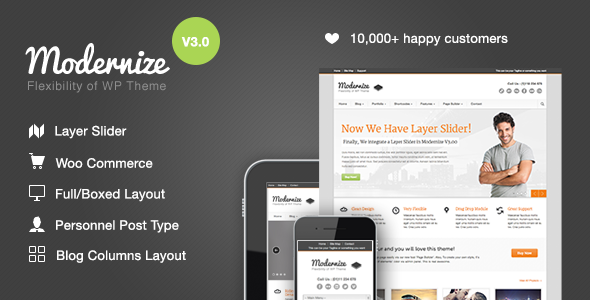
When building a business website on WordPress, the search for a theme that combines creative freedom with robust functionality often leads to a single destination. Modernize – Flexibility of WordPress delivers precisely what its name suggests: a versatile, feature-rich foundation designed for users who refuse to be boxed in by rigid templates. Developed by the reputable team at GoodLayers, this theme has already powered over 17,000 websites, proving its reliability and appeal across diverse industries. Whether you are building a site for a law firm, a restaurant, a school, or a corporate enterprise, Modernize provides the tools to craft a unique digital presence without requiring a deep background in coding. This article explores the core features, ideal use cases, and practical considerations of this popular WordPress theme, helping you decide if it is the right investment for your next project.
Key Features
- Drag-and-Drop Page Builder: The built-in page builder allows you to construct complex page layouts by simply dragging and dropping modules. This eliminates the need for custom code and speeds up the design process significantly.
- Unlimited Color Customization: Through the feature-rich admin panel, you can change the color of virtually every element on your site. This granular control ensures your brand identity is reflected accurately without editing style sheets.
- Unlimited Sidebars: You can create and assign as many unique sidebars as you need. This is particularly useful for sites with distinct sections, such as a blog, a shop, or a portfolio, each requiring its own widget area.
- 350+ Google Fonts and Custom Font Uploader: Typography choices are extensive. You can select from a massive library of web fonts or upload your own custom fonts using the built-in Cufon uploader for a truly personalized look.
- Built-in Translation and Localization: The theme comes with a .pot file ready for translation. Combined with the built-in translator interface, you can easily convert your site into any language, making it a strong choice for multilingual or localization-focused projects.
- SEO-Ready Architecture (V1.20+): GoodLayers restructured the theme to use proper heading tags (H1, H2, H3) and moved main content above sidebars in the HTML source code. This structure helps search engines crawl and index your most important content first. Support for alt tags on images further enhances your on-page SEO.
- Multiple Slider Options: The theme includes support for three different slider engines—Nivo Slider, Anything Slider, and Flex Slider—giving you flexibility in how you present featured content and images.
- 6 Footer Layouts: You are not locked into a single footer design. Choose from six pre-defined footer layouts to best organize your copyright information, menus, and widgets at the bottom of every page.
- Pre-Defined Background Patterns & Uploader: Start with one of 15 included background patterns, or upload your own custom background image. This feature allows for quick aesthetic changes without altering your core content.
- Social Media Integration: Easily add social share buttons to your posts and display social link icons in your header, encouraging visitors to connect with your brand across platforms.
Who Is This For? Use Cases
Corporate and Business Websites
The Modernize – Flexibility of WordPress theme is an excellent fit for corporate sites that need a professional appearance combined with easy content management. The unlimited color options and drag-and-drop builder allow marketing teams to create landing pages, service pages, and team directories without waiting for a developer. The SEO enhancements ensure that your corporate content ranks well, while the translation tools support international offices or clients.
Restaurants and Local Businesses
Local businesses, particularly restaurants and cafes, benefit from the theme’s visual tools. The slider options can showcase menu items or interior photos, while the social media links help drive engagement. The built-in price table feature is perfect for displaying service packages or menu tiers, and the mobile responsiveness ensures customers can find your hours and location from their phones.
Educational Institutions and Schools
Schools and educational organizations often require a clear, organized layout for different departments or grade levels. The unlimited sidebar feature allows you to create distinct widget areas for events, announcements, and resources. The localization support is a major advantage for schools serving multilingual communities or offering language immersion programs.
Lawyers and Professional Services
For lawyers, consultants, and medical professionals, trust and clarity are paramount. The clean, structured layouts of Modernize help present credentials, case studies, and service areas in a professional manner. The strong SEO foundation helps these sites compete for local search terms, and the custom background and color controls allow for a serious, branded aesthetic.
Freelancers and Agencies
Web design agencies and freelancers can use this theme as a reliable base for client projects. The extensive customization options allow you to create unique sites for different clients without starting from scratch each time. The drag-and-drop builder empowers clients to make minor content updates themselves, reducing the burden on your support team.
Technical Details & Compatibility
Modernize is built to integrate smoothly with the WordPress ecosystem. While it predates some of the newest block editor features, its own page builder fills that role effectively. The theme is responsive, ensuring your site looks correct on desktops, tablets, and mobile devices. It supports standard WordPress features like custom menus, widgets, and post thumbnails. The developer, GoodLayers, maintains a dedicated support site and has a documented changelog, signaling a commitment to updates and compatibility with newer versions of WordPress. The theme is compatible with major browsers, and its code is structured to work well with popular caching and SEO plugins. For media, you can assign static images, sliders, videos, or lightbox options to your thumbnails and featured content areas.
Pros and Cons
Pros
- Exceptional Customization Depth: The combination of unlimited colors, 350+ fonts, custom uploaders, and a drag-and-drop builder gives you near-total control over the visual output.
- Strong SEO Foundation: The structural improvements for heading tags and content order demonstrate a focus on search engine performance that many older themes lack.
- Proven Track Record: With over 17,000 sales, the theme has a large user base and a history of positive feedback, indicating reliability and good support.
- Excellent Value for $59: Considering the included page builder, slider engines, and localization tools, the one-time price of $59 offers significant value compared to purchasing these features as separate plugins.
- Multilingual Ready: The .pot file and built-in translator make it straightforward to create a site in any language, a feature often reserved for premium plugins.
Cons
- No Gutenberg Native Optimization: The theme was built before the full release of the WordPress block editor (Gutenberg). While it is compatible, it does not leverage the full power of the modern block editor.
- No Page Builder Plugin Independence: The drag-and-drop builder is proprietary to this theme. If you switch themes in the future, your page layouts may not transfer directly.
- Demo Content Not Included: The theme does not include the images shown in the demo. You will need to source your own imagery, which adds time and potential cost to your setup.
- Learning Curve for Admin Panel: While powerful, the extensive admin panel and its many options can feel overwhelming for a complete beginner who just wants a simple site.
Frequently Asked Questions
Is Modernize compatible with the latest version of WordPress?
Yes, the theme is designed to be compatible with current versions of WordPress. GoodLayers has a history of updating the theme to maintain compatibility, and the changelog documents these adjustments. It is always recommended to test the theme on a staging site before updating your live WordPress installation.
Can I use Modernize for a multilingual website?
Absolutely. The theme includes a built-in translator interface and comes with a .pot file ready for localization. You can translate each element of the theme directly from the admin panel or use a plugin like WPML or Polylang to manage translations. This makes it a strong choice for sites targeting international audiences.
What kind of support can I expect after purchasing?
GoodLayers provides support through their dedicated support portal at support.goodlayers.com. They typically respond within 14 hours on business days. The theme has received high praise for its customer support in user testimonials, indicating that the developer is responsive and helpful with setup and customization questions.
Final Verdict
The Modernize – Flexibility of WordPress theme stands as a testament to how a well-built, feature-rich theme can serve a vast array of website needs. With over 17,200 sales and a string of glowing testimonials praising both its functionality and the support from GoodLayers, it is a low-risk, high-value investment. The theme excels in providing granular control over design elements—from colors and fonts to layouts and sidebars—without forcing you to write a single line of code. Its strong SEO architecture and built-in translation tools make it a smart choice for businesses looking to grow their online presence. While it may not be the most modern choice for those who want a pure Gutenberg experience, its proprietary page builder is powerful and intuitive. For anyone needing a flexible, reliable, and visually customizable WordPress theme for a corporate, local business, or professional services site, Modernize remains a compelling and proven option. Backed by a responsive support team and a clear value proposition at $59, it is a purchase you can make with confidence. Visit the ThemeForest page today and see how Modernize can transform your next project.