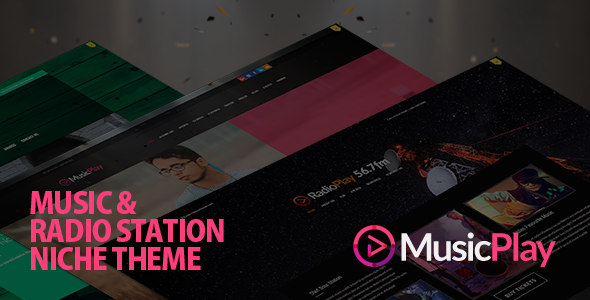
For musicians, DJs, record labels, and entertainment venues, a website is more than a digital business card—it is the central hub for streaming audio, promoting events, and building a fanbase. However, standard WordPress themes often fall short when handling the specific demands of audio streaming, discographies, and radio integration. The MusicPlay – Music & DJ Responsive WordPress Theme by AivahThemes was purpose-built to bridge that gap. This specialized theme transforms a standard WordPress installation into a fully functional music platform, complete with dedicated post types for artists, albums, and DJ mixes, alongside powerful streaming capabilities for Shoutcast and Icecast servers. Whether you are a solo artist looking to sell tracks or a radio station needing a robust online presence, this theme offers the structural integrity and creative flexibility required to stand out in a crowded digital landscape.
Key Features
MusicPlay is packed with features that cater specifically to the music industry. It moves beyond simple blogging to offer a comprehensive content management system for all types of audio and visual media. Here are the standout features that define this theme’s utility:
- Dedicated Custom Post Types: Manage your content efficiently with separate post types for Albums, Artists, DJ Mixes, Videos, Galleries, Events, and Radio stations. This ensures that your discography is organized logically without relying on messy workarounds or standard posts.
- Integrated Audio Player: The theme includes a full-width audio player (FWAP) that supports MP3 files, SoundCloud embeds, and external URLs. This player is designed to handle playlist generation, track downloads, and volume control directly on the front end.
- Radio Streaming Support: Specifically coded to work with Shoutcast, Icecast, and Radionomy servers, this feature allows you to stream live radio directly through your website using the jPlayer framework. It also fetches current song metadata from the stream to display what’s playing.
- Advanced Options Panel: A robust theme options panel allows you to control everything from unlimited color skinning to font selection. You can import and export these settings, making it easy to replicate configurations across multiple sites or restore backups.
- Extensive Shortcode Library: With over 100 shortcodes, including a generator for easy insertion, you can create complex layouts for albums, artists, testimonials, Google Maps, and typography without touching a line of code.
- SEO Optimized Structure: The main content block is placed before the sidebar in the HTML structure, ensuring search engine crawlers index your primary content first. This is a critical technical advantage for ranking your music and events.
- 14 Custom Widgets: Extend your sidebar and footer with widgets specifically designed for the music niche, including Popular Posts, Recent Posts, Testimonials, Twitter feeds, and dedicated Album/Artist widgets.
Who Is This For? Use Cases
The architecture of the MusicPlay theme makes it a versatile solution for various entities within the music and entertainment sectors. Its specific feature set, particularly around streaming and artist management, ensures that it is not a generic template but a specialized tool for specific audiences.
Musicians and Bands
For individual artists or bands, this theme provides an all-in-one solution. You can create a digital discography with individual album pages, link artists to their respective works, and utilize the 9 different post formats (including Audio, Video, and Gallery) to keep your blog content dynamic. The ability to add “Buy” and “Download” buttons on album tracks directly facilitates monetization of your music.
DJs and Remixers
The inclusion of a dedicated DJMix post type is a game-changer for DJs who need to showcase their mixes. Unlike standard audio players, this feature allows for categorization, custom tracklists, and specific meta-data. The sticky player ensures that the music continues to play as visitors navigate through your site, keeping them engaged with your content.
Radio Stations and Podcasters
Perhaps the most unique selling point of MusicPlay is its native support for live radio streaming. If you operate an internet radio station using Shoutcast or Icecast, this theme allows you to embed the stream directly into the site. The player displays current track information and supports AAC/M4A streams, providing a professional listening experience without needing a third-party player plugin.
Event Promoters and Venues
With a dedicated Events post type, you can list upcoming gigs and parties. The integration with Google Maps allows you to show venue locations, and the countdown shortcode builds anticipation for specific shows. This makes the theme suitable for nightclubs, music festivals, and event promoters who need to bridge the gap between music promotion and ticket sales.
Technical Details & Compatibility
Understanding the technical backbone of a theme is crucial for developers and site owners. The MusicPlay theme is built on a framework that prioritizes compatibility, though it does have specific considerations you should be aware of before installation.
WordPress Compatibility: The theme was originally built for WordPress 3.7+ but has been actively maintained. The changelog indicates specific fixes for WordPress 6.2+ compatibility, ensuring it functions correctly with the latest block editor and core updates.
Ajaxified Option: The theme offers an “Ajaxified” option for seamless page transitions. However, the developer notes that this feature may cause compatibility issues with some third-party plugins. For maximum plugin compatibility, it is recommended to use the non-Ajaxified mode. This is a crucial consideration for users who rely heavily on caching plugins or page builders.
Mobile Responsiveness: The theme is fully responsive, but it has a specific mobile behavior: Autoplay, the volume bar, and the visual playlist are automatically disabled when viewing the player on a mobile browser. This is a deliberate design choice to improve performance and avoid data usage issues on mobile networks.
Plugins and Extensions: Since version 12.0, the theme requires the “Musicplay Custom Widgets” plugin to restore old widgets and manage custom post type meta options. This decoupling keeps the theme lightweight and allows for plugin updates without breaking the core theme. It is also compatible with the Breadcrumb NavXT plugin for navigation.
Fonts and Icons: You have access to over 500+ Google Web Fonts and 300+ FontAwesome icons. This ensures that typography and UI elements can be customized to match your brand identity without loading external image files.
Pros and Cons
No theme is perfect, and understanding the limitations is just as important as recognizing the strengths. Here is a balanced look at what you can expect from MusicPlay.
Pros
- Niche-Specific Features: The dedicated post types for Radio, DJ Mixes, and Artists are rarely found in multi-purpose themes. This specialization saves time and provides a better user experience.
- Long-Term Maintenance: With updates spanning from 2013 to 2024 (v15.0), AivahThemes has demonstrated a commitment to keeping the theme compatible with the latest WordPress standards and security protocols.
- Extensive Customization: The ability to control colors, backgrounds, and fonts on a per-page or per-post basis offers granular control without needing a page builder.
- Strong Social Proof: With over 1,799 sales on ThemeForest, the theme has a proven track record and a substantial user base, indicating reliability and community support.
- Monetization Ready: The built-in Buy and Download buttons for tracks allow for direct sales integration, making it a viable option for selling music directly to fans.
Cons
- Ajax Compatibility Caveats: The Ajaxified mode, while nice for UX, can break third-party plugins. Users must be prepared to run the theme in “non-Ajax” mode if they rely on specific plugins for forms or caching.
- Learning Curve: The sheer number of options (100+ shortcodes, 14 widgets, multiple post types) can be overwhelming for beginners. It may take time to fully explore the theme options panel and understand the workflow for adding different content types.
- Visual Design Age: While functionality is robust, the default design aesthetic may feel dated compared to modern block-based themes that offer drag-and-drop styling. Customization is possible, but it requires effort to achieve a “modern” look.
- Mobile Player Limitations: The intentional disabling of autoplay and visual playlist on mobile could be a downside for users who want a consistent experience across all devices, though it is a practical trade-off for performance.
Frequently Asked Questions
Before purchasing, buyers often have specific technical questions regarding installation, licensing, and integration. Here are the answers to the most common queries regarding this theme.
Is the MusicPlay theme compatible with the latest version of WordPress and PHP 8?
Yes, the theme has been actively maintained to ensure compatibility. The changelog includes specific fixes for WordPress 6.2+ and PHP 7.4 compatibility issues. The latest updates (v13.0 and v15.0) include refactoring of scripts to remove deprecated jQuery events and update vendor prefixes, ensuring smooth operation on modern server environments. It is always recommended to check the latest changelog on ThemeForest for the most current compatibility information before updating.
Can I stream my existing Shoutcast or Icecast radio station using this theme?
Absolutely. This is one of the core strengths of the MusicPlay theme. It supports streaming via Shoutcast, Icecast, and Radionomy servers. You can create a “Radio” post type for each station and input your stream URL. The theme will fetch the current playing song metadata (for Icecast and Shoutcast) and display it in the player. Note that for Shoutcast servers, you may need to append ;stream/1 to the URL to access the audio live-stream.
What happens to my widgets and custom post types if I update from an old version to v13.0?
Since version 12.0, the theme has moved the custom post types and meta options into a separate plugin called Musicplay Custom Widgets. If you are updating from an older version, you must take a full backup first. After the update, you will need to install and activate the “Musicplay Custom Widgets” plugin to restore your old widgets and post type options. If you wish to revert to the old version, you must deactivate this plugin before activating the old theme to avoid errors.
Final Verdict
In a marketplace saturated with generic multi-purpose themes, the MusicPlay – Music & DJ Responsive WordPress Theme stands out as a specialized solution for a specific audience. AivahThemes has built a tool that respects the unique workflows of musicians, DJs, and broadcasters. The inclusion of dedicated post types for radio streams and DJ mixes is not just a feature list checkbox; it is a functional necessity that saves users from complicated custom post type plugins and coding. While the user interface requires a learning curve and the Ajax option demands caution regarding plugin conflicts, the core functionality is robust, time-tested, and actively supported.
The fact that the theme has been updated consistently since 2013—with the latest update in December 2024—is a strong indicator of its longevity and the developer’s commitment to the WordPress ecosystem. For a one-time investment of $60.00, you are not just buying a theme; you are purchasing a comprehensive music management system that handles audio players, video galleries, event listings, and radio streaming. If you are serious about establishing a professional online presence for your music or radio brand, the MusicPlay theme offers the specialized depth that general themes lack. It is a reliable, feature-rich investment for your digital presence.