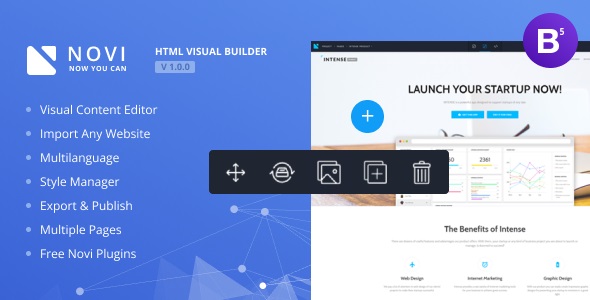
For developers who build and sell static HTML templates, the gap between delivering a product and empowering a client to manage it has always been a commercial friction point. Novi – HTML Page Builder & Visual Content Editor solves this by transforming any valid HTML template into a fully editable, drag-and-drop website builder environment. Built by the developer novibuilder, this tool is designed specifically for template authors who want to add recurring value to their offerings without rewriting code from scratch. Instead of handing over raw files, you provide a professional editing interface that lets clients change text, images, layouts, and styles visually, all while preserving the integrity of the original code.
Key Features
Novi is not a typical WordPress plugin; it is a standalone visual editor that works directly with your existing HTML projects. Here are the core capabilities that define its workflow:
- Import Any Valid HTML Template: The central promise is simplicity. You can import a standard HTML template into the builder environment in roughly three clicks, making it an accessible tool for developers who do not want to rebuild projects from scratch.
- Visual Content Editing: Editing is performed directly on the page. You can click on any text block to start typing, replace images through the media library, and move design elements without ever opening a code editor.
- Preset System: Save your own design blocks and configurations as presets. This allows for rapid reuse of custom sliders, content sections, or form layouts across different projects or client pages.
- Style Manager & Code Editor: For deeper customization, the tool includes a Style Manager within the HTML Code Editor. This allows for granular control over CSS properties, including the ability to inspect specific elements and edit their source code directly.
- Comprehensive Plugin Suite: The builder includes a robust set of integrated plugins. This covers essential website functionality such as Swiper Slider, Owl Carousel, Google Maps, Mailform, Subscribe forms, Social plugins, and Lightgallery for media presentation.
- Media Library Management: A dedicated library handles all your imagery. It supports drag-and-drop uploads, image reduction, cropping, and even integration with the Unsplash service for accessing thousands of licensed stock photos directly within the editor.
- Multilanguage & Localization: The interface supports multiple languages, with Russian, German, and French included out of the box. The system architecture also allows for adding more languages as needed.
- Project Export/Import: You maintain full control over your work. Projects can be exported and imported, allowing you to move between local development environments and remote servers or share editable project files with team members.
- SEO & Analytics Tools: Recent updates added an SEO section within Project Settings, enabling the generation of sitemap.xml and files. An Analytics section allows for the direct integration of Google Analytics, Google Tag Manager, and Facebook Pixel.
- Multi-Resolution Preview: You can preview your website across different screen resolutions to ensure the responsive design behaves correctly for mobile, tablet, and desktop users.
Who Is This For? Use Cases
While the tool is technical, its value proposition is commercial. It primarily serves developers and designers who want to elevate their service offering.
HTML Template Developers & Agencies
If you sell templates on marketplaces or directly to clients, Novi acts as a value-add layer. Instead of providing a static product that clients cannot modify without breaking the layout, you can offer an installation where the client has the power to update their own content. This reduces the burden of “small change” requests on your support team and allows agencies to charge premium rates for a “managed” template solution.
Freelance Web Designers
For freelancers who build custom sites on static HTML frameworks, this builder provides a way to hand over the reins at the end of the project. You can use Novi to import the bespoke site you built, configure the editable zones, and train the client to use the visual editor for blog posts, portfolio updates, or service descriptions. This makes your workflow more efficient and the final deliverable more robust.
Web Developers Creating Niche CMS Solutions
Because Novi is not tied to a specific CMS like WordPress, it is suitable for developers who need a lightweight content management system for micro-sites, landing pages, or web applications where a full CMS is overkill. The password authorization feature allows you to lock the builder interface, ensuring only authorized users can enter edit mode.
Designers Working with CSS Frameworks
The builder supports preconfigured project layers for popular CSS frameworks. This means if your static template is built on Bootstrap 5 or uses CSS variables, Novi can interpret those structures correctly, allowing you to edit them visually without conflicts.
Technical Details & Compatibility
Understanding the system requirements is crucial before purchasing. Novi is a client-side application that runs in the browser, but it requires a server environment to manage files and assets.
- Browser Support: The editor is optimized for Chrome 50+ and Safari 10+. It is recommended to use these browsers for the best performance and stability.
- Server Requirements: The system runs on Apache 2.2+ with PHP 5.4+. It relies on the mod_rewrite module for Apache; security modules like ModSecurity should be disabled to prevent interference.
- PHP Configuration: Specific PHP settings are required, including a memory limit of 64M, upload_max_filesize of 64M, and post_max_size of 64M. The mbstring PHP extension must be enabled.
- Local vs. Remote: The software can be installed locally (using XAMPP or similar stacks) or on a remote server. The package structure includes a documentation folder, a demo folder, and the core builder folder.
- Performance & Updates: The changelog indicates a strong history of optimization. Updates have drastically improved Google Fonts loading speed and reduced browser memory usage. An anti-cache feature was added to ensure new updates reflect immediately without hard reloads.
- Framework Compatibility: Version 1.0.0 added specific compatibility with CSS variables and Bootstrap 5, ensuring modern templates work seamlessly.
Pros and Cons
Evaluating the strengths and limitations helps determine if this is the right tool for your development stack.
Pros
- Commercial Upsell Opportunity: It transforms a one-time template sale into a full “website solution” that justifies higher pricing.
- Non-Technical Client Handoff: Clients can edit content with a single click, reducing the need for extensive training or constant developer support.
- No Vendor Lock-In: Since it works with standard HTML, you are not forced to build your templates specifically for a proprietary CMS structure.
- Integrated Toolset: The inclusion of sliders, galleries, forms, and map plugins means you don’t need to source and integrate third-party JavaScript libraries manually for the builder to function.
- Active Development & Support: The changelog shows consistent updates since 2017, covering bug fixes, new features (like Unsplash integration and SEO tools), and compatibility patches.
- Value for Money: Priced at $16.00, it is an affordable investment for developers looking to add a professional layer to their service without a high overhead cost.
Cons
- Security Module Conflicts: The requirement to disable ModSecurity or similar security modules on your server might be a dealbreaker for developers using strict shared hosting environments where these settings cannot be altered.
- Specific Browser Limitations: Lack of support for Firefox (as noted in earlier changelogs) and reliance on Chrome or Safari could be restrictive for teams that standardize on other browsers.
- PHP Version Legacy: The requirement for PHP 5.4+ is quite dated. While it may run on newer versions, developers using the latest PHP 8.x architecture might encounter compatibility warnings depending on their host configuration.
- Learning Curve for Complex Edits: While basic text and image editing is simple, mastering the Style Manager, preset creation, and source code editing requires a learning curve that goes beyond “drag and drop” for complete novices.
Frequently Asked Questions
Can I use Novi – HTML Page Builder & Visual Content Editor with a template I already sold to a client?
Yes, that is the primary use case. If you have a valid HTML template, you can import it into the builder environment. The tool is designed to work with standard HTML, CSS, and JavaScript files. Once imported, you can configure the project settings and publish it to your server, allowing the client to log in and edit content visually without touching the code.
Does the builder work on WordPress or other Content Management Systems?
No, Novi is not a plugin for WordPress. It is a standalone application that runs on a PHP-enabled server (Apache). It serves as an alternative to a traditional CMS. If you need a visual editor specifically for WordPress, this tool is not the correct choice. However, if you want to make a static HTML site editable without integrating a heavy CMS like WordPress, Novi is specifically designed for that purpose.
What happens if I need to change the design layout of the template later?
You can use the integrated HTML Code Editor and Style Manager to modify the source code directly. The builder allows you to inspect elements, edit CSS files (including local CSS files connected via @import), and manage fonts. For layout changes, you can use the visual drag-and-drop features to rearrange elements or rely on the code editor for structural changes. After edits, you must publish the project to push the changes live.
Final Verdict
Novi – HTML Page Builder & Visual Content Editor occupies a unique space in the web development toolkit. It is not a competitor to massive platforms like Wix or WordPress; rather, it is a specialized bridge that connects professional HTML developers with non-technical end-users. With over 2,070 sales on CodeCanyon, it has proven its utility in the developer community. The developer, novibuilder, has demonstrated a commitment to the product through a detailed changelog that shows regular improvements, active bug fixes, and the addition of modern features like Unsplash integration and Bootstrap 5 support.
The primary strength lies in its commercial application. For the low price of $16.00, it offers a mechanism to increase the perceived value of your templates, allowing you to sell not just a design, but a complete, manageable website solution. While the system requirements are specific and lean towards legacy server configurations, the benefits for client retention and reduced support requests are substantial.
If you are a template developer looking to differentiate your products in a crowded market or a freelancer wanting to provide a polished, self-service editing experience to your clients, this builder is a strategic asset. It allows you to focus on high-level design and development while empowering your clients to handle their own content updates.
Ready to multiply your template earnings and deliver a professional editing experience? Purchase Novi – HTML Page Builder & Visual Content Editor today and start importing your HTML templates into a fully visual environment.