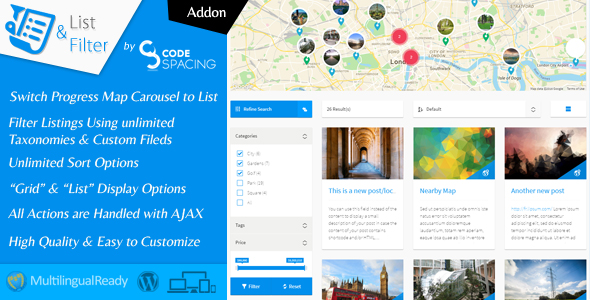
Progress Map, List & Filter – WordPress Plugin is a powerful extension built for the Progress Map ecosystem that converts a standard map carousel into a fully searchable, filterable, and sortable directory of listings. Designed for WordPress site owners who rely on location-based content, this plugin adds an advanced search layer, AJAX-powered pagination, grid and list layouts, and unlimited custom sorting options on top of the base map experience. If you run a real estate portal, a store locator, or any directory where visitors need to narrow hundreds of entries down to the few that matter, this extension gives you the tools to do it without custom development. It is developed by codespacing and has been downloaded more than 1,465 times on CodeCanyon.
Key Features
- Advanced multi-filter search — Visitors can narrow listings using multiple taxonomy terms (categories) and/or custom fields simultaneously, turning a large dataset into precise results in a few clicks.
- Unlimited custom sorting options — Beyond standard A-to-Z ordering, you can build sort rules from your own custom fields, such as “Sort by Price” or “Sort by Surface,” and control the order in which those options appear.
- Grid and list display modes — Listings can be presented in either a grid or a list format, giving you flexibility in how content is showcased across different pages and layouts.
- AJAX-driven interactions — Filtering, sorting, and pagination are all handled via AJAX, so results update instantly without full page reloads for a smooth, app-like browsing experience.
- Extensive layout customization — Nearly every element can be adjusted through the settings pages, including filter width, map width, list view options, grid columns, and the position of the search filter.
- Flexible filter field types — The search form supports keyword fields, publish-date filtering, number fields, single and double range sliders, price fields, and text fields with input masks.
- Multiple filters per site — You can create an unlimited number of distinct filters, each assignable to a different map, so separate directories can each have their own search logic.
- Serialized custom field support — Custom fields storing serialized values can be displayed in the filter and used to filter posts by one or multiple stored options.
- Map-to-list synchronization — An option lets the map center on an item’s position when a visitor hovers over it in the list for half a second, and list items can scroll into view when their map marker is clicked.
- Modal post previews — Single post pages can open inside a modal or popup directly from the list, keeping visitors in context instead of sending them away from the results.
- Query result caching — Filter queries are cached and automatically cleared when the map cache is cleared or posts are updated, keeping performance stable as your directory grows.
- Translation-ready — Custom field options in the filter can be translated through WPML String Translation, and the plugin includes a .pot file for translating default strings.
Who Is This For? Use Cases
This extension is purpose-built for WordPress sites that already use Progress Map and need to scale from a simple visual map into a genuine searchable directory. The following scenarios illustrate where it delivers the most value.
Real Estate Agencies and Property Portals
Property listings are the classic use case. Agents can let buyers filter by category (apartment, house, land), price range, surface area, and publication date, then sort results by price or size. The range slider and price field types make numeric filtering intuitive, while modal previews let buyers scan listings quickly without losing their search results.
Store Locators and Multi-Location Businesses
Businesses with dozens or hundreds of branches can present locations in a grid or list alongside the map, with filters for region, services offered, or opening hours stored in custom fields. AJAX pagination keeps large location sets fast to browse, and the keyword filter helps visitors jump straight to a specific branch or city.
Directories and Listing Marketplaces
Any niche directory — restaurants, hotels, service providers, dealers — benefits from faceted search. Because you can create unlimited filters and assign each to a different map, a single WordPress installation can host multiple independent directories, each with its own taxonomies, custom fields, and sort options.
Agencies and Freelance Developers
Developers building client sites on Progress Map can use this extension to deliver a complete directory solution without writing custom filter queries. The settings-driven approach means most customization happens in the admin, reducing build time and making handover to clients straightforward. Layout controls for map width, filter width, and column counts help match each client’s design.
Bloggers and Content Publishers
Publishers who map articles, travel guides, or event coverage can add a searchable index of posts. Date filtering and keyword search make archives more usable, and the option to hide list items until a search is submitted keeps landing pages clean.
Technical Details & Compatibility
Progress Map, List & Filter is a WordPress plugin that functions as an add-on: the core Progress Map WordPress Plugin must be installed for this extension to work. The most recent release, version 4.0, is compatible with Progress Map v6.0, and the changelog shows a consistent pattern of compatibility updates tracking each major release of the parent plugin.
On the platform side, the plugin has been tested against modern WordPress versions, including fixes specifically for WordPress 6.7 compatibility and full-site-editing/block themes, where an earlier script-enqueuing conflict was resolved. PHP 8 support was added in version 3.7, with subsequent patches addressing PHP 8.0 type errors and undefined-variable warnings, so the codebase is current with modern hosting stacks.
For multilingual sites, the plugin integrates with WPML, including string translation for filter field options and fixes for WPML URL formats using rewrite rules. Performance is addressed through optimized SQL queries for loading and filtering locations, SVG-based frontend assets replacing older PNG images, and the version 4.0 query caching layer. All frontend interactions — filtering, sorting, and pagination — run over AJAX, and the output is responsive by design. The plugin is also translation-ready via a bundled .pot file, and developers can hook into term ordering with the cspml_filter_terms_orderby and cspml_filter_terms_order hooks.
Pros and Cons
Pros
- Deep filtering flexibility — combining taxonomy terms with custom fields, including serialized values, covers far more search scenarios than typical directory plugins.
- Fully customizable sorting — unlimited sort options built from your own custom fields give visitors meaningful ways to order results.
- Settings-driven setup — layout, filter position, field order, and display options are all configurable without touching code.
- Strong update history — years of regular releases with documented bug fixes and compatibility patches signal active maintenance.
- Solid value at $54 — a one-time price for a feature set that would otherwise require significant custom development.
- Proven track record — over 1,465 sales on CodeCanyon from developer codespacing.
Cons
- Requires Progress Map — it is an extension, not a standalone plugin, so the base plugin purchase is an additional cost.
- Learning curve on complex setups — with unlimited filters, field types, and sort rules, initial configuration takes time on large directories.
- Tied to the parent plugin’s roadmap — major Progress Map updates have historically required matching compatibility releases here.
- No rating data listed — the marketplace listing does not display a rating, so buyers should review the demo and changelog before purchasing.
Frequently Asked Questions
Do I need the Progress Map plugin to use this extension?
Yes. Progress Map, List & Filter is an add-on that extends the Progress Map WordPress Plugin, and the parent plugin must be installed and active for this extension to function. Budget for both purchases if you do not already own Progress Map.
Can I filter listings by price, date, or custom field values?
Yes. The search filter supports taxonomy terms and custom fields, with field types including keyword, publish date, number, single and double range sliders, price, range price, and masked text fields. You can also create custom sort options such as “Sort by Price” or “Sort by Surface” from your own custom fields.
Is the plugin compatible with the latest WordPress and PHP versions?
Recent releases include fixes for WordPress 6.7, block themes and full-site editing, and PHP 8 compatibility, and version 4.0 is compatible with Progress Map v6.0. As with any extension, confirm compatibility with your specific WordPress, PHP, and parent plugin versions before updating a live site.
Final Verdict
Progress Map, List & Filter – WordPress Plugin solves a specific but demanding problem: turning a visual map into a usable, searchable directory. Its combination of multi-taxonomy and custom-field filtering, unlimited custom sort options, AJAX pagination, and grid or list layouts puts it well ahead of basic store locator add-ons. The development record from codespacing is a genuine credibility signal — years of documented releases covering PHP 8, WordPress 6.7, WPML, block themes, and each Progress Map version show a developer who maintains what they sell. With more than 1,465 sales and a one-time price of $54, it represents strong value for anyone already invested in Progress Map who needs professional-grade search and filtering.
If your WordPress site depends on location-based listings and visitors currently have to scroll through results one by one, this extension is the upgrade that changes how your directory performs. Explore the live demo, confirm your Progress Map version, and add Progress Map, List & Filter to your toolkit today.