Key Features
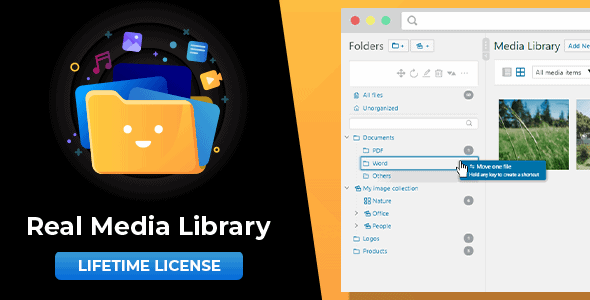
- Folder, Collection, and Gallery Organization: The plugin offers a three-tier organizational structure. Standard folders can hold any file type and other collections, collections act as containers for sub-collections and galleries (but not files), and gallery folders are specifically for images, allowing you to easily identify where your visual content is stored.
- Drag & Drop File Management: Manage your media library with the intuitive drag-and-drop interface. You can move files into folders, rearrange the order of folders within the tree, and sort the contents of any folder manually by dragging items into your preferred sequence.
- Shortcut Creation Without Duplicates: Create shortcuts of a single media file to place it in multiple folders. These shortcuts take up zero additional storage space (0 kb), allowing you to organize content logically without bloating your database.
- Dynamic Galleries via Gutenberg Block or Shortcode: Generate front-end galleries directly from a folder. Use the dedicated Gutenberg block or a shortcode to display all images from a specific folder as a customizable gallery on your posts or pages.
- Bulk Select and Folder Import: Save time by selecting multiple folders and deleting them at once. The plugin also includes an import tool that allows you to migrate categories and folders from other popular media management plugins like FileBird, WP Media Folder, and Advanced Media Library.
- Quick Folder Search & Filtering: Navigate large folder structures instantly using the quick folder search feature. The plugin also integrates directly into the WordPress “Insert Media” dialog, allowing you to filter by folder without leaving the post editor.
- Advanced Uploader: Upload files directly into a specific folder from the media library uploader, streamlining your workflow and preventing files from landing in the default “Uncategorized” area.
Who Is This For? Use Cases
Content-Heavy Bloggers and Publishers
If you manage a blog or news site that publishes dozens of images per week, you know how quickly the default flat media library becomes unusable. Real Media Library: Media Library Folder & File Manager for Media Management in WordPress allows you to segregate media by month, topic, or author. Instead of scrolling through thousands of files named “photo-1.jpg” through “photo-5000.jpg,” you can navigate directly to the folder for “Q4 Marketing Campaign” and find exactly what you need in seconds.
Freelance Designers and Agencies
Freelancers and agencies managing multiple client sites benefit from the structured folder system. You can create a top-level folder for each client, with sub-folders for “Logos,” “Mockups,” “Final Assets,” and “Stock Photos.” The drag-and-drop sorting and bulk delete features significantly reduce the time spent cleaning up client sites after project completion. The import tool is also invaluable when migrating a client’s existing site from a different media management plugin.
E-commerce Store Owners
Running a WooCommerce store means managing product images, variations, and marketing assets. Use folders to separate “Product Photos,” “Banners,” “Promotional Graphics,” and “Customer Uploads.” The dynamic gallery feature allows you to create a Gutenberg block that displays all images from your “New Arrivals” folder, automatically updating your homepage gallery whenever you upload new product shots.
Developers and Site Administrators
For developers maintaining complex WordPress sites or multisite networks, the ability to create shortcuts without consuming storage space is a game-changer. You can keep a master folder of “Stock Assets” and create shortcuts in individual post or page folders. The plugin’s compatibility with WordPress Multisite ensures each site in your network maintains its own independent folder tree, preventing cross-site contamination of media libraries.
Technical Details & Compatibility
Real Media Library: Media Library Folder & File Manager for Media Management in WordPress is built for modern WordPress environments. It requires WordPress 5.9 or newer and is fully compatible with the Gutenberg block editor. The plugin runs on PHP 7.4 or newer, including full support for PHP 8, and requires MySQL 5.7 or newer or MariaDB 10.3 or newer.
For browser compatibility, the plugin supports the latest versions of Google Chrome, Mozilla Firefox, Microsoft Edge, and Apple Safari. It is translated into several languages and works seamlessly with all major themes, page builders (such as Elementor and Beaver Builder), and popular plugins. The plugin also supports WordPress Multisite, where each site in the network maintains its own independent folder tree. Importantly, the plugin is GDPR/DSGVO compliant and does not collect any personal data without your explicit consent.
The developer, devowl, provides regular updates that include bug fixes and new features. All updates are included free of charge with your purchase, and a complete changelog is available for review.
Pros and Cons
Pros
- Intuitive Drag-and-Drop Interface: The workflow feels natural and familiar, similar to using a desktop file manager like Windows Explorer or Mac Finder.
- Zero-Storage Shortcuts: The ability to place a file in multiple folders using shortcuts that take up 0 kb is a standout feature that saves server space and reduces database bloat.
- Dynamic Galleries: Creating galleries directly from folders using the Gutenberg block or shortcode is a powerful time-saver for content creators.
- Import Tool: Migrating from other media folder plugins (FileBird, WP Media Folder, etc.) is straightforward, reducing the friction of switching tools.
- Bulk Operations: The ability to bulk-select and delete multiple folders, combined with sorting by criteria, significantly improves administrative efficiency.
- Excellent Value: At $79.00 with lifetime updates included, this is a cost-effective solution compared to subscription-based alternatives that charge annually.
Cons
- No Front-End User Management: The plugin is designed for backend administration only. If you need to allow front-end users (such as members or customers) to upload and organize their own files, you will need additional plugins.
- Learning Curve for Hierarchy: The distinction between folders, collections, and galleries is clear but requires a few minutes of setup to understand fully. Users expecting a simple “all files in one folder” structure may find the three-tier system initially confusing.
- Requires Modern Hosting: The PHP 7.4 and MySQL 5.7 minimum requirements mean that older shared hosting environments may not be compatible. Users on legacy hosting may need to upgrade their server before installing.
Frequently Asked Questions
Is Real Media Library compatible with page builders like Elementor or WPBakery?
Yes. The plugin is designed to be compatible with all major page builders and themes. Because it integrates directly into the core WordPress media library system, any page builder or plugin that uses the standard WordPress media uploader will automatically respect your folder structure. You can insert images from specific folders directly within Elementor, WPBakery, Beaver Builder, or the Gutenberg editor without any additional configuration.
Can I migrate my existing folders from another plugin like FileBird or WP Media Folder?
Absolutely. Real Media Library: Media Library Folder & File Manager for Media Management in WordPress includes a built-in import tool that supports migration from FileBird, WP Media Folder, Advanced Media Library, Media Library Wizard, and several other plugins. This allows you to switch to Real Media Library without losing your existing folder organization. The import process is straightforward and preserves your current folder hierarchy.
Does this plugin work with WordPress Multisite and how are folders handled?
Yes, the plugin fully supports WordPress Multisite. Each site within your network maintains its own independent folder tree. This means that folders created on Site A are not visible on Site B, preventing cross-site media conflicts. The folder structure is stored per-site, so administrators of each subsite can organize their media library according to their own needs without affecting other sites in the network.
Final Verdict
With over 22,786 sales on CodeCanyon and a strong reputation from the developer devowl, Real Media Library: Media Library Folder & File Manager for Media Management in WordPress is a proven, reliable solution for anyone struggling with WordPress media management. It transforms the chaotic flat list of the default media library into a structured, searchable, and intuitive file system that mirrors the desktop tools you already know how to use. The combination of drag-and-drop functionality, zero-storage shortcuts, dynamic galleries, and bulk operations makes it a comprehensive tool that saves time for bloggers, agencies, e-commerce managers, and developers alike.
The plugin is backed by regular updates, excellent compatibility with modern WordPress environments, and a one-time price of $79.00 that includes all future updates. If you are tired of scrolling through thousands of untitled images or spending hours searching for that one specific PDF, this plugin is the investment that will pay for itself in time saved within your first week of use. Click the link below to purchase your copy and take control of your WordPress media library today.