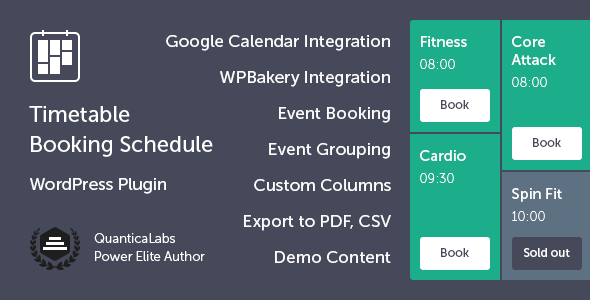
Managing a complex schedule of events, classes, or appointments across multiple days, locations, or instructors can quickly become a logistical headache. For WordPress site owners who need a robust, professional solution that goes beyond a simple calendar, Timetable Booking Schedule for WordPress from QuanticaLabs offers a powerful and complete system. This plugin is not just a display tool; it is a fully integrated booking and reservation engine designed for businesses that rely on precise scheduling. Whether you run a gym, a dance studio, a medical clinic, or an educational institution, this tool provides the functionality to create detailed timetables, manage event occurrences, and allow users to book spots directly from your site. With over 10,800 sales and a strong reputation on CodeCanyon, it has proven its value as a reliable, feature-rich solution for complex scheduling needs.
Key Features
- Built-in Booking System: Users can reserve spots directly from the timetable. You can set maximum seat limits, restrict bookings per user, and manage availability in real-time without needing a third-party plugin.
- Comprehensive Timetable Builder: A dedicated shortcode generator lets you create professional schedules. You can select specific events, categories, and columns, and choose between table or list views with flexible time intervals (15, 30, or 60 minutes).
- Google Calendar Integration: Synchronize your schedules by importing and exporting events to and from Google Calendar. This ensures your online timetable and your personal calendar are always aligned.
- PDF & CSV Export: Generate a clean, printable PDF of your entire timetable view with a single click. You can also export reservation data to CSV for offline management and reporting.
- Custom Email Notifications: Automate communication with custom email templates for both admins and users. The plugin supports SMTP settings to ensure reliable delivery of booking confirmations and cancellation notices.
- Fully Responsive & Customizable: The timetable adapts seamlessly to all screen sizes. You can customize colors, Google Fonts, and apply custom CSS, with independent styling controls for the timetable, widgets, and single event pages.
- Advanced Event Management: Use dedicated custom post types to create and manage events and their recurring occurrences. An event occurrences shortcode allows you to display all upcoming instances of a specific event.
- Upcoming Events Widget: A built-in, scrollable widget displays today’s events or upcoming schedules, making it easy for visitors to see what is happening next without navigating away from the page.
- Filtering & Layout Options: Users can filter events by category or specific events using dropdown or tab-based navigation. Multiple event block layouts and custom timetable columns (for days, rooms, trainers) provide maximum flexibility.
- Page Builder Compatibility: Integrates seamlessly with WPBakery Page Builder and is compatible with Elementor, allowing you to build and manage layouts directly within your preferred page builder interface.
Who Is This For? Use Cases
Fitness & Wellness Centers
Gyms, yoga studios, and fitness clubs can display class schedules for different instructors and rooms. Members can book a spot in a popular spin class or yoga session directly from the timetable, with the system automatically managing capacity limits.
Educational Institutions & Workshops
Schools, universities, and training centers can use the plugin to publish course timetables, lecture schedules, or workshop calendars. Students can view their weekly plan, and administrators can manage room assignments and recurring classes with ease.
Medical & Beauty Clinics
Dental clinics, physiotherapy centers, and beauty salons can manage appointment slots for multiple practitioners. The booking functionality allows clients to reserve a specific time with their preferred professional, reducing administrative phone calls.
Event & Conference Organizers
For multi-track conferences, festivals, or nightlife events, the timetable provides a clear overview of sessions and stages. Attendees can filter by category to find relevant talks and use the PDF export to save their personal schedule.
Technical Details & Compatibility
Timetable Booking Schedule for WordPress is built with clean, valid HTML5 code and is fully cross-browser compatible. It is designed to work seamlessly with modern WordPress installations. The plugin is fully responsive, ensuring that your schedules look and function perfectly on desktops, tablets, and mobile devices. It integrates directly with WPBakery Page Builder and is also compatible with Elementor, though it functions perfectly without either page builder installed. The plugin supports RTL (right-to-left) languages and includes a one-click demo importer to quickly set up sample content, tables, and widgets. QuanticaLabs provides regular updates and comprehensive documentation to ensure ongoing compatibility and performance.
Pros and Cons
Pros
- All-in-One Solution: Combines a visual timetable builder with a powerful booking engine, eliminating the need for multiple plugins.
- High Customizability: Offers extensive control over colors, fonts, CSS, time formats, and event layouts to match any brand.
- Proven Track Record: With over 10,800 sales and a strong developer reputation, the plugin is a stable, trusted choice.
- Excellent Value: Priced at $49.00, it provides a complete booking and scheduling system that would cost significantly more if purchased as separate tools.
- Robust Export Options: The ability to export timetables to PDF and reservations to CSV is a major advantage for professional reporting and sharing.
- Real-Time Booking Management: Built-in seat limits, user restrictions, and a dedicated booking panel make managing reservations straightforward.
Cons
- Learning Curve for Complex Setups: While the shortcode generator is user-friendly, creating highly customized timetables with multiple columns and recurring events may require some initial time investment.
- Limited Native Payment Integration: The booking system does not include built-in payment processing for paid bookings, which may require additional development or a third-party e-commerce plugin.
- Dependence on Developer Support: While support is responsive, users with very specific customization needs may find the feature set rigid without custom development work.
Frequently Asked Questions
Does Timetable Booking Schedule work with Elementor or Gutenberg?
Yes, the plugin is compatible with Elementor and works perfectly with the standard WordPress block editor (Gutenberg). While it has native integration with WPBakery Page Builder, it does not require it. You can use the shortcode generator to embed timetables anywhere on your site, including pages built with Elementor or the block editor.
Can I use this plugin to accept payments for bookings?
The plugin does not include a built-in payment gateway. Its core function is to manage schedules, display timetables, and handle free reservations with seat limits. To accept payments for bookings, you would typically need to integrate it with an e-commerce plugin like WooCommerce or use a third-party booking system that supports payments.
Is the booking system suitable for managing appointments for multiple staff members?
Absolutely. The plugin allows you to create custom timetable columns for different instructors, trainers, or doctors. You can assign events to specific individuals and manage their schedules independently. The booking system will then allow clients to reserve a spot with their preferred staff member based on the available slots.
Final Verdict
Timetable Booking Schedule for WordPress stands out as a mature, highly capable plugin that solves a real problem for businesses and organizations with complex scheduling needs. Developed by the experienced team at QuanticaLabs, it combines the visual clarity of a professional timetable with the operational efficiency of a built-in booking system. Its strong sales history and positive user feedback are testaments to its reliability and depth of features. For the $49.00 price point, you are getting a tool that replaces the need for separate scheduling and reservation plugins, offering a cohesive workflow that saves time and reduces friction for both administrators and end-users. If you run a site where classes, events, or appointments need to be displayed clearly and booked easily, this plugin is a smart, proven investment. Try it today to bring order and efficiency to your scheduling process.